
 Krzysztof Kudrynski
49e23b4597
Adding links to performance benchmark page
Krzysztof Kudrynski
49e23b4597
Adding links to performance benchmark page
|
%!s(int64=4) %!d(string=hai) anos | |
|---|---|---|
| .. | ||
| deployment_toolkit | %!s(int64=4) %!d(string=hai) anos | |
| plots | %!s(int64=4) %!d(string=hai) anos | |
| scripts | %!s(int64=4) %!d(string=hai) anos | |
| README.md | %!s(int64=4) %!d(string=hai) anos | |
| calculate_metrics.py | %!s(int64=4) %!d(string=hai) anos | |
| config_model_on_triton.py | %!s(int64=4) %!d(string=hai) anos | |
| convert_model.py | %!s(int64=4) %!d(string=hai) anos | |
| dataloader.py | %!s(int64=4) %!d(string=hai) anos | |
| metrics.py | %!s(int64=4) %!d(string=hai) anos | |
| model.py | %!s(int64=4) %!d(string=hai) anos | |
| preprocess.py | %!s(int64=4) %!d(string=hai) anos | |
| requirements.txt | %!s(int64=4) %!d(string=hai) anos | |
| run_inference_on_fw.py | %!s(int64=4) %!d(string=hai) anos | |
| run_inference_on_triton.py | %!s(int64=4) %!d(string=hai) anos | |
| run_offline_performance_test_on_triton.py | %!s(int64=4) %!d(string=hai) anos | |
| run_online_performance_test_on_triton.py | %!s(int64=4) %!d(string=hai) anos | |
README.md
Deploying the nnUNet model on Triton Inference Server
This folder contains instructions for deployment to run inference on the Triton Inference Server and a detailed performance analysis. The purpose of this document is to help you achieve the best inference performance.
Table of contents
- Solution overview
- Setup
- Quick Start Guide
- Advanced
- Performance
- Offline scenario
- Offline: NVIDIA DGX-1 (1x V100 32GB) with FP16
- Offline: NVIDIA DGX-1 (1x V100 32GB) with FP32
- Offline: NVIDIA A40 with FP16
- Offline: NVIDIA A40 with FP32
- Offline: NVIDIA T4 with FP16
- Offline: NVIDIA T4 with FP32
- Offline: NVIDIA DGX A100 (1x A100 80GB) with FP16
- Offline: NVIDIA DGX A100 (1x A100 80GB) with FP32
- Online scenario
- Online: NVIDIA DGX A100 (1x A100 80GB) with FP16
- Online: NVIDIA DGX A100 (1x A100 80GB) with FP32
- Online: NVIDIA A40 with FP16
- Online: NVIDIA A40 with FP32
- Online: NVIDIA T4 with FP16
- Online: NVIDIA T4 with FP32
- Online: NVIDIA DGX-1 (1x V100 32GB) with FP16
- Online: NVIDIA DGX-1 (1x V100 32GB) with FP32
- Offline scenario
- Release Notes
Solution overview
Introduction
The NVIDIA Triton Inference Server provides a datacenter and cloud inferencing solution optimized for NVIDIA GPUs. The server provides an inference service via an HTTP or gRPC endpoint that allows remote clients to request inferencing for any number of GPU or CPU models being managed by the server.
This README provides step-by-step deployment instructions for models generated during training (as described in the model README). Additionally, this README provides the corresponding deployment scripts that ensure optimal GPU utilization during inferencing on the Triton Inference Server.
Deployment process
The deployment process consists of two steps:
- Conversion. The purpose of conversion is to find the best performing model format supported by the Triton Inference Server. Triton Inference Server uses a number of runtime backends such as TensorRT, LibTorch and ONNX Runtime to support various model types. Refer to Triton documentation for the list of available backends.
- Configuration. Model configuration on the Triton Inference Server, which generates necessary configuration files.
To run benchmarks measuring the model performance in inference, perform the following steps:
- Start the Triton Inference Server.
The Triton Inference Server container is started in one (possibly remote) container and the ports for gRPC or REST API are exposed.
- Run accuracy tests.
Produce results that are tested against given accuracy thresholds. Refer to step 8 in the Quick Start Guide.
- Run performance tests.
Produce latency and throughput results for offline (static batching) and online (dynamic batching) scenarios. Refer to step 10 in the Quick Start Guide.
Setup
Ensure you have the following components:
- NVIDIA Docker
- PyTorch NGC container 21.02
- Triton Inference Server NGC container 21.02
- NVIDIA CUDA repository
- NVIDIA Ampere, Volta or Turing based GPU
Quick Start Guide
To deploy your model on Triton Inference Server perform the following steps using the default parameters of the nnUNet model on the Medical Segmentation Decathlon dataset. For the specifics concerning inference, see the Advanced section.
Clone the repository. IMPORTANT: This step is executed on the host computer.
git clone https://github.com/NVIDIA/DeepLearningExamples.git
cd DeepLearningExamples/PyTorch/Segmentation/nnUNet
Setup the environment on the host computer and start the Triton Inference Server.
source triton/scripts/setup_environment.sh
bash triton/scripts/docker/triton_inference_server.sh
Build and run a container that extends the NGC PyTorch container with the Triton Inference Server client libraries and dependencies.
bash triton/scripts/docker/build.sh
bash triton/scripts/docker/interactive.sh
Prepare the deployment configuration and create folders in Docker.
IMPORTANT: These and the following commands must be executed in the PyTorch NGC container.
source triton/scripts/setup_environment.sh
Download and pre-process the dataset.
bash triton/scripts/download_data.sh
bash triton/scripts/process_dataset.sh
Setup parameters for deployment.
source triton/scripts/setup_parameters.shConvert the model from training to inference format (for example TensorRT).
python3 triton/convert_model.py \
    --input-path triton/model.py \
    --input-type pyt \
    --output-path ${SHARED_DIR}/model \
    --output-type ${FORMAT} \
    --onnx-opset 12 \
    --onnx-optimized 1 \
    --max-batch-size ${MAX_BATCH_SIZE} \
    --max-workspace-size 4294967296 \
    --ignore-unknown-parameters \
    --checkpoint-dir ${CHECKPOINT_DIR}/nvidia_nnunet_pyt_ckpt_amp_3d_fold2.ckpt \
    --precision ${PRECISION} \
    --dataloader triton/dataloader.py \
    --data-dir ${DATASETS_DIR}/01_3d/ \
    --batch-size 1 \
Configure the model on the Triton Inference Server.
Generate the configuration from your model repository.
    python3 triton/config_model_on_triton.py \
            --model-repository ${MODEL_REPOSITORY_PATH} \
            --model-path ${SHARED_DIR}/model \
            --model-format ${FORMAT} \
            --model-name ${MODEL_NAME} \
            --model-version 1 \
            --max-batch-size ${MAX_BATCH_SIZE} \
            --precision ${PRECISION} \
            --number-of-model-instances ${NUMBER_OF_MODEL_INSTANCES} \
            --preferred-batch-sizes ${TRITON_PREFERRED_BATCH_SIZES} \
            --max-queue-delay-us ${TRITON_MAX_QUEUE_DELAY} \
            --capture-cuda-graph 0 \
            --backend-accelerator ${BACKEND_ACCELERATOR} \
            --load-model ${TRITON_LOAD_MODEL_METHOD}
Run the Triton Inference Server accuracy tests.
python3 triton/run_inference_on_triton.py \
        --server-url ${TRITON_SERVER_URL}:8001 \
        --model-name ${MODEL_NAME} \
        --model-version 1 \
        --output-dir ${SHARED_DIR}/accuracy_dump \
        \
        --dataloader triton/dataloader.py \
        --data-dir ${DATASETS_DIR}/01_3d \
        --batch-size ${MAX_BATCH_SIZE} \
        --precision ${PRECISION} \
        --dump-labels

python3 triton/calculate_metrics.py \
        --metrics triton/metrics.py \
        --dump-dir ${SHARED_DIR}/accuracy_dump \
        --csv ${SHARED_DIR}/accuracy_metrics.csv

cat ${SHARED_DIR}/accuracy_metrics.csv
Run the Triton Inference Server performance online tests.
We want to maximize throughput within latency budget constraints.
Dynamic batching is a feature of the Triton Inference Server that allows
inference requests to be combined by the server, so that a batch is
created dynamically, resulting in a reduced average latency.
You can set the Dynamic Batcher parameter max_queue_delay_microseconds to
indicate the maximum amount of time you are willing to wait and
preferred_batch_size to indicate your maximum server batch size
in the Triton Inference Server model configuration. The measurements
presented below set the maximum latency to zero to achieve the best latency
possible with good performance.
    python triton/run_online_performance_test_on_triton.py \
            --server-url ${TRITON_SERVER_URL} \
            --model-name ${MODEL_NAME} \
            --input-data random \
            --batch-sizes ${BATCH_SIZE} \
            --triton-instances ${TRITON_INSTANCES} \
            --number-of-model-instances ${NUMBER_OF_MODEL_INSTANCES} \
            --shared-memory \
            --result-path ${SHARED_DIR}/triton_performance_online.csv
- Run the Triton Inference Server performance offline tests.
We want to maximize throughput. It assumes you have your data available for inference or that your data saturate to maximum batch size quickly. Triton Inference Server supports offline scenarios with static batching. Static batching allows inference requests to be served as they are received. The largest improvements to throughput come from increasing the batch size due to efficiency gains in the GPU with larger batches. This example uses shared-memory.
    python triton/run_offline_performance_test_on_triton.py \
            --server-url ${TRITON_SERVER_URL} \
            --model-name ${MODEL_NAME} \
            --input-data random \
            --batch-sizes ${BATCH_SIZE} \
            --triton-instances ${TRITON_INSTANCES} \
            --shared-memory \
            --result-path ${SHARED_DIR}/triton_performance_offline.csv
Advanced
Triton embedded deployment
Triton embedded deployment means that client and server are running on the same machine (e.g. MRI).
The shared-memory extensions allow a client to communicate input and output tensors by system or CUDA shared memory. Using shared memory instead of sending the tensor data over the GRPC or REST interface can provide significant performance improvement for some use cases. Because both of these extensions are supported, Triton reports "system_shared_memory" and "cuda_shared_memory" in the extensions field of its Server Metadata.
More information about shared memory can be found here Shared memory
Prepare configuration
You can use the environment variables to set the parameters of your inference configuration.
Triton deployment scripts support several inference runtimes listed in the table below:
| Inference runtime | Mnemonic used in scripts |
|-------------------|--------------------------|
| TorchScript Tracing | ts-trace |
| TorchScript Tracing | ts-script |
| ONNX | onnx |
| NVIDIA TensorRT | trt |
Example values of some key variables in one configuration:
PRECISION="fp16"
FORMAT="ts-script"
BATCH_SIZE="1, 2, 4"
BACKEND_ACCELERATOR="cuda"
MAX_BATCH_SIZE="4"
NUMBER_OF_MODEL_INSTANCES="1"
TRITON_MAX_QUEUE_DELAY="1"
TRITON_PREFERRED_BATCH_SIZES="2 4"
Latency explanation
A typical Triton Inference Server pipeline can be broken down into the following steps:
- The client serializes the inference request into a message and sends it to the server (Client Send).
- The message travels over the network from the client to the server (Network).
- The message arrives at the server and is deserialized (Server Receive).
- The request is placed on the queue (Server Queue).
- The request is removed from the queue and computed (Server Compute).
- The completed request is serialized in a message and sent back to the client (Server Send).
- The completed message then travels over the network from the server to the client (Network).
- The completed message is deserialized by the client and processed as a completed inference request (Client Receive).
Generally, for local clients, steps 1-4 and 6-8 occupy a small fraction of time, compared to steps 5. As backend deep learning systems like Jasper are rarely exposed directly to end users, but instead only interfacing with local front-end servers, for the sake of Jasper, we can consider that all clients are local.
Performance
The performance measurements in this document were conducted at the time of publication and may not reflect the performance achieved from NVIDIA’s latest software release. For the most up-to-date performance measurements, go to NVIDIA Data Center Deep Learning Product Performance.
Offline scenario
This table lists the common variable parameters for all performance measurements:
| Parameter Name | Parameter Value |
|---|---|
| Model Format | TorchScript Scripting |
| Backend Accelerator | CUDA |
| Max Batch Size | 4 |
| Number of model instances | 1 |
| Triton Max Queue Delay | 1 |
| Triton Preferred Batch Sizes | 2 4 |
GPU: NVIDIA DGX-1 (1x V100 32GB)
 |
 |
Offline: NVIDIA DGX-1 (1x V100 32GB) with FP16
Our results were obtained using the following configuration:
- GPU: NVIDIA DGX-1 (1x V100 32GB)
- Backend: PyTorch
- Backend accelerator: CUDA
- Precision: FP16
- Model Format: TorchScript
- Conversion variant: Script
- Image resolution: 4x128x128x128
Full tabular data
| Precision | Client Batch Size | Inferences/second | P90 Latency | P95 Latency | P99 Latency | Avg Latency | |:------------|--------------------:|--------------------:|--------------:|--------------:|--------------:|--------------:| | FP16 | 1 | 20.3 | 49.295 | 49.329 | 49.386 | 49.188 | | FP16 | 2 | 25.2 | 79.464 | 79.529 | 79.611 | 79.247 | | FP16 | 4 | 28.4 | 140.378 | 140.639 | 140.844 | 139.634 |Offline: NVIDIA DGX-1 (1x V100 32GB) with FP32
Our results were obtained using the following configuration:
- GPU: NVIDIA DGX-1 (1x V100 32GB)
- Backend: PyTorch
- Backend accelerator: CUDA
- Precision: FP32
- Model Format: TorchScript
- Conversion variant: Script
- Image resolution: 4x128x128x128
Full tabular data
| Precision | Client Batch Size | Inferences/second | P90 Latency | P95 Latency | P99 Latency | Avg Latency | |:------------|--------------------:|--------------------:|--------------:|--------------:|--------------:|--------------:| | FP32 | 1 | 10.3 | 97.262 | 97.335 | 97.56 | 96.908 | | FP32 | 2 | 10.6 | 186.551 | 186.839 | 187.05 | 185.747 | | FP32 | 4 | 11.2 | 368.61 | 368.982 | 370.119 | 366.781 |GPU: NVIDIA A40
 |
 |
Offline: NVIDIA A40 with FP16
Our results were obtained using the following configuration:
- GPU: NVIDIA A40
- Backend: PyTorch
- Backend accelerator: CUDA
- Precision: FP16
- Model Format: TorchScript
- Conversion variant: Script
- Image resolution: 4x128x128x128
Full tabular data
| Precision | Client Batch Size | Inferences/second | P90 Latency | P95 Latency | P99 Latency | Avg Latency | |:------------|--------------------:|--------------------:|--------------:|--------------:|--------------:|--------------:| | FP16 | 1 | 22.2 | 44.997 | 45.001 | 45.011 | 44.977 | | FP16 | 2 | 28.2 | 70.697 | 70.701 | 70.711 | 70.667 | | FP16 | 4 | 32 | 126.1 | 126.111 | 126.13 | 126.061 |Offline: NVIDIA A40 with FP32
Our results were obtained using the following configuration:
- GPU: NVIDIA A40
- Backend: PyTorch
- Backend accelerator: CUDA
- Precision: FP32
- Model Format: TorchScript
- Conversion variant: Script
- Image resolution: 4x128x128x128
Full tabular data
| Precision | Client Batch Size | Inferences/second | P90 Latency | P95 Latency | P99 Latency | Avg Latency | |:------------|--------------------:|--------------------:|--------------:|--------------:|--------------:|--------------:| | FP32 | 1 | 11.1 | 90.236 | 90.35 | 90.438 | 89.503 | | FP32 | 2 | 11.4 | 176.345 | 176.521 | 176.561 | 176.063 | | FP32 | 4 | 10.8 | 360.355 | 360.631 | 360.668 | 359.839 |GPU: NVIDIA T4
 |
 |
Offline: NVIDIA T4 with FP16
Our results were obtained using the following configuration:
- GPU: NVIDIA T4
- Backend: PyTorch
- Backend accelerator: CUDA
- Precision: FP16
- Model Format: TorchScript
- Conversion variant: Script
- Image resolution: 4x128x128x128
Full tabular data
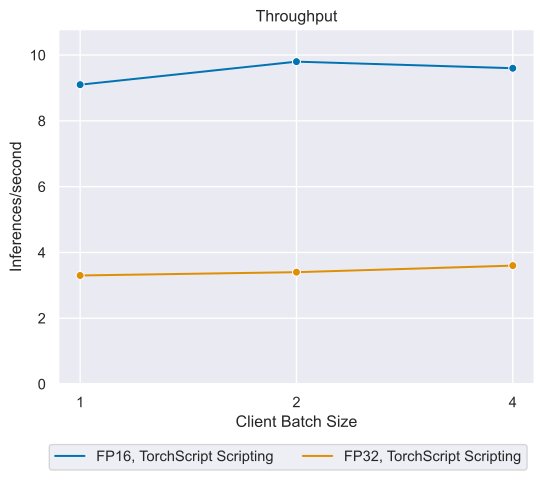
| Precision | Client Batch Size | Inferences/second | P90 Latency | P95 Latency | P99 Latency | Avg Latency | |:------------|--------------------:|--------------------:|--------------:|--------------:|--------------:|--------------:| | FP16 | 1 | 9.1 | 110.197 | 110.598 | 111.201 | 109.417 | | FP16 | 2 | 9.8 | 209.083 | 209.347 | 209.9 | 208.026 | | FP16 | 4 | 9.6 | 411.128 | 411.216 | 411.711 | 409.599 |Offline: NVIDIA T4 with FP32
Our results were obtained using the following configuration:
- GPU: NVIDIA T4
- Backend: PyTorch
- Backend accelerator: CUDA
- Precision: FP32
- Model Format: TorchScript
- Conversion variant: Script
- Image resolution: 4x128x128x128
Full tabular data
| Precision | Client Batch Size | Inferences/second | P90 Latency | P95 Latency | P99 Latency | Avg Latency | |:------------|--------------------:|--------------------:|--------------:|--------------:|--------------:|--------------:| | FP32 | 1 | 3.3 | 298.003 | 298.23 | 298.585 | 295.594 | | FP32 | 2 | 3.4 | 592.412 | 592.505 | 592.881 | 591.209 | | FP32 | 4 | 3.6 | 1188.76 | 1189.1 | 1189.1 | 1187.24 |GPU: NVIDIA DGX A100 (1x A100 80GB)
 |
 |
Offline: NVIDIA DGX A100 (1x A100 80GB) with FP16
Our results were obtained using the following configuration:
- GPU: NVIDIA DGX A100 (1x A100 80GB)
- Backend: PyTorch
- Backend accelerator: CUDA
- Precision: FP16
- Model Format: TorchScript
- Conversion variant: Script
- Image resolution: 4x128x128x128
Full tabular data
| Precision | Client Batch Size | Inferences/second | P90 Latency | P95 Latency | P99 Latency | Avg Latency | |:------------|--------------------:|--------------------:|--------------:|--------------:|--------------:|--------------:| | FP16 | 1 | 26.1 | 38.326 | 38.353 | 38.463 | 38.29 | | FP16 | 2 | 38 | 52.893 | 52.912 | 52.95 | 52.859 | | FP16 | 4 | 48.8 | 81.778 | 81.787 | 81.8 | 81.738 |Offline: NVIDIA DGX A100 (1x A100 80GB) with FP32
Our results were obtained using the following configuration:
- GPU: NVIDIA DGX A100 (1x A100 80GB)
- Backend: PyTorch
- Backend accelerator: CUDA
- Precision: FP32
- Model Format: TorchScript
- Conversion variant: Script
- Image resolution: 4x128x128x128
Full tabular data
| Precision | Client Batch Size | Inferences/second | P90 Latency | P95 Latency | P99 Latency | Avg Latency | |:------------|--------------------:|--------------------:|--------------:|--------------:|--------------:|--------------:| | FP32 | 1 | 34.6 | 29.043 | 29.088 | 29.159 | 28.918 | | FP32 | 2 | 39.4 | 50.942 | 50.991 | 51.118 | 50.835 | | FP32 | 4 | 21.2 | 299.924 | 322.953 | 354.473 | 191.724 |Online scenario
This table lists the common variable parameters for all performance measurements: | Parameter Name | Parameter Value | |:-----------------------------|:----------------------| | Model Format | TorchScript Scripting | | Backend Accelerator | CUDA | | Max Batch Size | 4 | | Number of model instances | 1 | | Triton Max Queue Delay | 1 | | Triton Preferred Batch Sizes | 2 4 |
GPU: NVIDIA DGX A100 (1x A100 80GB)
Online: NVIDIA DGX A100 (1x A100 80GB) with FP16
Our results were obtained using the following configuration:
- GPU: NVIDIA DGX A100 (1x A100 80GB)
- Backend: PyTorch
- Backend accelerator: CUDA
- Precision: FP16
- Model Format: TorchScript
- Conversion variant: Script
- Image resolution: 4x128x128x128

Full tabular data
| Concurrent client requests | Inferences/second | Client Send | Network+server Send/recv | Server Queue | Server Compute Input | Server Compute Infer | Server Compute Output | Client Recv | P50 Latency | P90 Latency | P95 Latency | P99 Latency | Avg Latency | |-----------------------------:|--------------------:|--------------:|---------------------------:|---------------:|-----------------------:|-----------------------:|------------------------:|--------------:|--------------:|--------------:|--------------:|--------------:|--------------:| | 1 | 26.1 | 0.021 | 0.081 | 0.012 | 0.037 | 3.582 | 34.551 | 0 | 38.287 | 38.318 | 38.328 | 38.356 | 38.284 | | 2 | 26.2 | 0.022 | 0.078 | 38.109 | 0.036 | 3.582 | 34.552 | 0 | 76.381 | 76.414 | 76.423 | 76.433 | 76.379 | | 3 | 33 | 0.021 | 0.095 | 42.958 | 0.05 | 3.55 | 44.282 | 0 | 90.956 | 90.992 | 91.013 | 91.107 | 90.956 | | 4 | 38.4 | 0.031 | 0.112 | 45.07 | 0.069 | 3.527 | 55.545 | 0 | 104.352 | 104.399 | 104.419 | 104.486 | 104.354 | | 5 | 41.6 | 0.027 | 0.131 | 46.829 | 0.089 | 3.522 | 69.262 | 0 | 119.861 | 119.903 | 119.91 | 119.935 | 119.86 | | 6 | 44.4 | 0.031 | 0.127 | 62.269 | 0.085 | 3.493 | 68.42 | 0 | 134.425 | 134.467 | 134.488 | 134.608 | 134.425 | | 7 | 47.6 | 0.028 | 0.146 | 72.667 | 0.091 | 3.473 | 71.421 | 0 | 147.828 | 147.868 | 147.883 | 147.912 | 147.826 | | 8 | 49.2 | 0.031 | 0.147 | 81.538 | 0.101 | 3.46 | 78.08 | 0 | 163.351 | 163.406 | 163.435 | 163.607 | 163.357 |Online: NVIDIA DGX A100 (1x A100 80GB) with FP32
Our results were obtained using the following configuration:
- GPU: NVIDIA DGX A100 (1x A100 80GB)
- Backend: PyTorch
- Backend accelerator: CUDA
- Precision: FP32
- Model Format: TorchScript
- Conversion variant: Script
- Image resolution: 4x128x128x128

Full tabular data
| Concurrent client requests | Inferences/second | Client Send | Network+server Send/recv | Server Queue | Server Compute Input | Server Compute Infer | Server Compute Output | Client Recv | P50 Latency | P90 Latency | P95 Latency | P99 Latency | Avg Latency | |-----------------------------:|--------------------:|--------------:|---------------------------:|---------------:|-----------------------:|-----------------------:|------------------------:|--------------:|--------------:|--------------:|--------------:|--------------:|--------------:| | 1 | 34.6 | 0.022 | 0.085 | 0.012 | 0.057 | 3.54 | 25.197 | 0 | 28.889 | 29.044 | 29.07 | 29.126 | 28.913 | | 2 | 34.7 | 0.03 | 0.101 | 28.707 | 0.056 | 3.55 | 25.185 | 0 | 57.585 | 57.755 | 57.787 | 58.012 | 57.629 | | 3 | 37.8 | 0.027 | 0.105 | 36.011 | 0.085 | 3.482 | 39.84 | 0 | 79.502 | 79.656 | 79.688 | 79.771 | 79.55 | | 4 | 39.6 | 0.026 | 0.135 | 50.617 | 0.097 | 3.424 | 47.198 | 0 | 101.463 | 101.683 | 101.718 | 101.818 | 101.497 | | 5 | 40 | 0.033 | 0.112 | 59.913 | 0.461 | 3.556 | 60.649 | 0 | 124.66 | 124.832 | 125.114 | 126.906 | 124.724 | | 6 | 37.2 | 0.03 | 0 | 83.268 | 1.142 | 3.545 | 78.663 | 0 | 148.762 | 149.446 | 150.996 | 411.775 | 166.648 | | 7 | 28.7 | 0.039 | 0.252 | 115 | 1.132 | 65.661 | 61.857 | 0 | 243.459 | 245.291 | 246.747 | 247.342 | 243.941 | | 8 | 23.6 | 0.039 | 0.199 | 168.972 | 1.052 | 112.231 | 55.827 | 0 | 338.232 | 339.188 | 339.275 | 340.472 | 338.32 |GPU: NVIDIA A40
Online: NVIDIA A40 with FP16
Our results were obtained using the following configuration:
- GPU: NVIDIA A40
- Backend: PyTorch
- Backend accelerator: CUDA
- Precision: FP16
- Model Format: TorchScript
- Conversion variant: Script
- Image resolution: 4x128x128x128

Full tabular data
| Concurrent client requests | Inferences/second | Client Send | Network+server Send/recv | Server Queue | Server Compute Input | Server Compute Infer | Server Compute Output | Client Recv | P50 Latency | P90 Latency | P95 Latency | P99 Latency | Avg Latency | |-----------------------------:|--------------------:|--------------:|---------------------------:|---------------:|-----------------------:|-----------------------:|------------------------:|--------------:|--------------:|--------------:|--------------:|--------------:|--------------:| | 1 | 22.2 | 0.073 | 0.304 | 0.019 | 0.07 | 4.844 | 39.599 | 0 | 44.912 | 44.93 | 44.938 | 44.951 | 44.909 | | 2 | 22.4 | 0.075 | 0.299 | 44.198 | 0.069 | 4.844 | 39.598 | 0 | 89.083 | 89.107 | 89.12 | 89.22 | 89.083 | | 3 | 25.9 | 0.073 | 0.335 | 52.735 | 0.106 | 4.814 | 56.894 | 0 | 114.959 | 114.987 | 114.996 | 115.006 | 114.957 | | 4 | 28 | 0.073 | 0.364 | 57.54 | 0.152 | 4.798 | 79.237 | 0 | 142.167 | 142.205 | 142.215 | 142.226 | 142.164 | | 5 | 29.8 | 0.074 | 0.373 | 80.998 | 0.158 | 4.765 | 81.681 | 0 | 168.052 | 168.103 | 168.114 | 168.147 | 168.049 | | 6 | 30.9 | 0.074 | 0.386 | 97.176 | 0.181 | 4.756 | 92.607 | 0 | 195.172 | 195.235 | 195.252 | 195.666 | 195.18 | | 7 | 31.5 | 0.077 | 0.357 | 109.266 | 0.213 | 4.774 | 108.641 | 0 | 223.325 | 223.389 | 223.4 | 223.473 | 223.328 | | 8 | 32 | 0.074 | 0.359 | 125.387 | 0.237 | 4.783 | 120.746 | 0 | 251.573 | 252.62 | 252.698 | 252.857 | 251.586 |Online: NVIDIA A40 with FP32
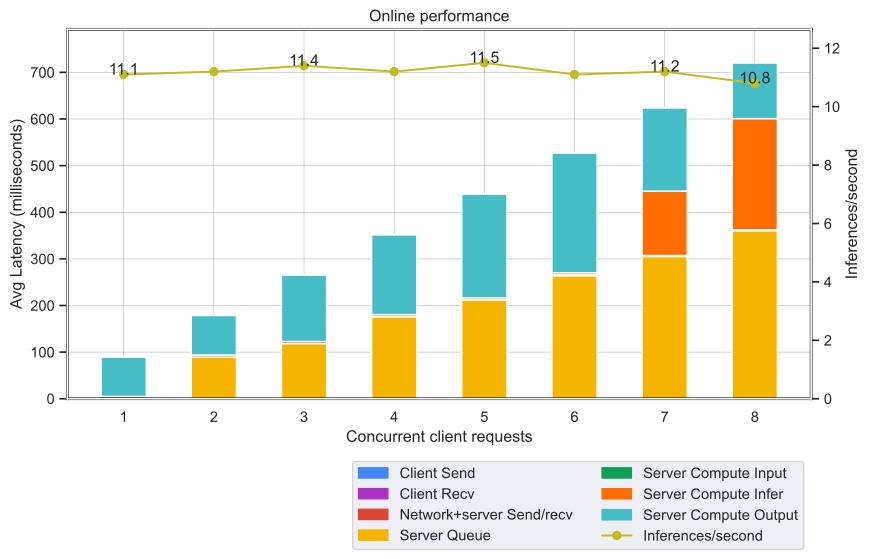
Our results were obtained using the following configuration:
- GPU: NVIDIA A40
- Backend: PyTorch
- Backend accelerator: CUDA
- Precision: FP32
- Model Format: TorchScript
- Conversion variant: Script
- Image resolution: 4x128x128x128
Full tabular data
| Concurrent client requests | Inferences/second | Client Send | Network+server Send/recv | Server Queue | Server Compute Input | Server Compute Infer | Server Compute Output | Client Recv | P50 Latency | P90 Latency | P95 Latency | P99 Latency | Avg Latency | |-----------------------------:|--------------------:|--------------:|---------------------------:|---------------:|-----------------------:|-----------------------:|------------------------:|--------------:|--------------:|--------------:|--------------:|--------------:|--------------:| | 1 | 11.1 | 0.08 | 0.286 | 0.019 | 0.124 | 4.467 | 84.525 | 0 | 89.588 | 90.336 | 90.375 | 90.553 | 89.501 | | 2 | 11.2 | 0.077 | 0.348 | 88.89 | 0.123 | 4.467 | 84.637 | 0 | 178.634 | 179.887 | 179.99 | 180.176 | 178.542 | | 3 | 11.4 | 0.078 | 0.3 | 117.917 | 0.194 | 4.391 | 142.344 | 0 | 265.26 | 265.901 | 265.941 | 266.351 | 265.224 | | 4 | 11.2 | 0.078 | 0.321 | 175.491 | 0.231 | 4.355 | 171.23 | 0 | 351.697 | 352.266 | 352.337 | 352.512 | 351.706 | | 5 | 11.5 | 0.078 | 0.353 | 210.898 | 0.671 | 4.372 | 222.115 | 0 | 438.481 | 439.348 | 439.379 | 439.805 | 438.487 | | 6 | 11.1 | 0.078 | 0.389 | 263.225 | 2.16 | 4.413 | 256.974 | 0 | 527.101 | 528.705 | 528.849 | 528.966 | 527.239 | | 7 | 11.2 | 0.076 | 0.204 | 304.798 | 2.216 | 138.105 | 178.66 | 0 | 624.066 | 625.626 | 625.732 | 625.977 | 624.059 | | 8 | 10.8 | 0.074 | 0.459 | 359.748 | 2.213 | 238.331 | 119.62 | 0 | 720.475 | 721.2 | 721.206 | 721.513 | 720.445 |GPU: NVIDIA T4
Online: NVIDIA T4 with FP16
Our results were obtained using the following configuration:
- GPU: NVIDIA T4
- Backend: PyTorch
- Backend accelerator: CUDA
- Precision: FP16
- Model Format: TorchScript
- Conversion variant: Script
- Image resolution: 4x128x128x128

Full tabular data
| Concurrent client requests | Inferences/second | Client Send | Network+server Send/recv | Server Queue | Server Compute Input | Server Compute Infer | Server Compute Output | Client Recv | P50 Latency | P90 Latency | P95 Latency | P99 Latency | Avg Latency | |-----------------------------:|--------------------:|--------------:|---------------------------:|---------------:|-----------------------:|-----------------------:|------------------------:|--------------:|--------------:|--------------:|--------------:|--------------:|--------------:| | 1 | 9.1 | 0.109 | 0.388 | 0.015 | 0.151 | 3.082 | 105.624 | 0 | 109.31 | 110.144 | 110.413 | 110.505 | 109.369 | | 2 | 9.2 | 0.116 | 0.399 | 108.562 | 0.154 | 3.094 | 105.774 | 0 | 218.195 | 219.242 | 219.55 | 219.902 | 218.099 | | 3 | 9.3 | 0.116 | 0.5 | 141.682 | 0.244 | 3.043 | 171.276 | 0 | 316.812 | 319.269 | 319.839 | 320.185 | 316.861 | | 4 | 9.8 | 0.116 | 0.397 | 207.308 | 0.288 | 3.053 | 204.455 | 0 | 415.558 | 416.726 | 416.902 | 417.25 | 415.617 | | 5 | 9.7 | 0.115 | 0.263 | 252.215 | 0.372 | 3.06 | 268.918 | 0 | 525.233 | 526.928 | 527.007 | 527.18 | 524.943 | | 6 | 9.6 | 0.114 | 0.431 | 316.091 | 0.43 | 3.087 | 313.056 | 0 | 633.186 | 634.815 | 634.871 | 634.899 | 633.209 | | 7 | 9.4 | 0.115 | 0.385 | 356.97 | 0.507 | 3.106 | 364.103 | 0 | 725.346 | 726.226 | 726.345 | 727.387 | 725.186 | | 8 | 10 | 0.116 | 0.425 | 408.406 | 0.57 | 3.122 | 405.21 | 0 | 818.009 | 819.843 | 819.911 | 820.552 | 817.849 |Online: NVIDIA T4 with FP32
Our results were obtained using the following configuration:
- GPU: NVIDIA T4
- Backend: PyTorch
- Backend accelerator: CUDA
- Precision: FP32
- Model Format: TorchScript
- Conversion variant: Script
- Image resolution: 4x128x128x128

Full tabular data
| Concurrent client requests | Inferences/second | Client Send | Network+server Send/recv | Server Queue | Server Compute Input | Server Compute Infer | Server Compute Output | Client Recv | P50 Latency | P90 Latency | P95 Latency | P99 Latency | Avg Latency | |-----------------------------:|--------------------:|--------------:|---------------------------:|---------------:|-----------------------:|-----------------------:|------------------------:|--------------:|--------------:|--------------:|--------------:|--------------:|--------------:| | 1 | 3.3 | 0.12 | 0.359 | 0.016 | 0.286 | 2.823 | 292.021 | 0 | 296.31 | 298.223 | 298.333 | 299.091 | 295.625 | | 2 | 3.4 | 0.121 | 0.482 | 295.028 | 0.285 | 2.821 | 292.411 | 0 | 590.8 | 593.113 | 593.181 | 593.506 | 591.148 | | 3 | 3.3 | 0.118 | 0.364 | 398.407 | 0.462 | 2.827 | 484.536 | 0 | 887.21 | 888.227 | 888.444 | 889.069 | 886.714 | | 4 | 3.2 | 0.117 | 0.359 | 591.981 | 0.559 | 2.819 | 589.073 | 0 | 1185.4 | 1187.74 | 1187.74 | 1188.02 | 1184.91 | | 5 | 3.5 | 0.13 | 0.54 | 711.986 | 1.026 | 2.816 | 768.727 | 0 | 1485.15 | 1488.09 | 1488.09 | 1488.8 | 1485.22 | | 6 | 3.3 | 0.137 | 0.263 | 891.924 | 2.513 | 2.816 | 887.156 | 0 | 1784.96 | 1786.4 | 1786.65 | 1786.65 | 1784.81 | | 7 | 3.5 | 0.134 | 0.61 | 1024 | 3.064 | 2.783 | 1061.49 | 0 | 2092.74 | 2094.77 | 2094.77 | 2094.77 | 2092.08 | | 8 | 3.2 | 0.135 | 0.858 | 1195.84 | 3.696 | 2.769 | 1189.92 | 0 | 2393.93 | 2394.67 | 2394.67 | 2394.67 | 2393.22 |GPU: NVIDIA DGX-1 (1x V100 32GB)
Online: NVIDIA DGX-1 (1x V100 32GB) with FP16
Our results were obtained using the following configuration:
- GPU: NVIDIA DGX-1 (1x V100 32GB)
- Backend: PyTorch
- Backend accelerator: CUDA
- Precision: FP16
- Model Format: TorchScript
- Conversion variant: Script
- Image resolution: 4x128x128x128

Full tabular data
| Concurrent client requests | Inferences/second | Client Send | Network+server Send/recv | Server Queue | Server Compute Input | Server Compute Infer | Server Compute Output | Client Recv | P50 Latency | P90 Latency | P95 Latency | P99 Latency | Avg Latency | |-----------------------------:|--------------------:|--------------:|---------------------------:|---------------:|-----------------------:|-----------------------:|------------------------:|--------------:|--------------:|--------------:|--------------:|--------------:|--------------:| | 1 | 20.4 | 0.054 | 0.21 | 0.022 | 0.07 | 5.813 | 43.068 | 0 | 49.227 | 49.347 | 49.374 | 49.481 | 49.237 | | 2 | 20.5 | 0.058 | 0.259 | 48.734 | 0.075 | 5.8 | 43.081 | 0 | 97.959 | 98.151 | 98.226 | 98.817 | 98.007 | | 3 | 23.4 | 0.068 | 0.31 | 58.668 | 0.105 | 5.88 | 62.955 | 0 | 127.949 | 128.335 | 128.59 | 128.9 | 127.986 | | 4 | 25.2 | 0.068 | 0.282 | 78.717 | 0.123 | 5.779 | 73.061 | 0 | 157.991 | 158.398 | 158.599 | 158.762 | 158.03 | | 5 | 26.5 | 0.063 | 0.303 | 90.872 | 0.15 | 5.866 | 91.174 | 0 | 188.376 | 188.815 | 189.039 | 189.349 | 188.428 | | 6 | 27.6 | 0.067 | 0.344 | 98.88 | 0.192 | 6.017 | 112.827 | 0 | 218.299 | 219.14 | 219.271 | 219.443 | 218.327 | | 7 | 28.3 | 0.065 | 0.285 | 121.672 | 0.194 | 5.721 | 120.488 | 0 | 248.344 | 249.172 | 249.232 | 249.367 | 248.425 | | 8 | 28.8 | 0.056 | 0.251 | 138.819 | 0.209 | 4.977 | 133.895 | 0 | 277.678 | 279.799 | 280 | 280.367 | 278.207 |Online: NVIDIA DGX-1 (1x V100 32GB) with FP32
Our results were obtained using the following configuration:
- GPU: NVIDIA DGX-1 (1x V100 32GB)
- Backend: PyTorch
- Backend accelerator: CUDA
- Precision: FP32
- Model Format: TorchScript
- Conversion variant: Script
- Image resolution: 4x128x128x128

Full tabular data
| Concurrent client requests | Inferences/second | Client Send | Network+server Send/recv | Server Queue | Server Compute Input | Server Compute Infer | Server Compute Output | Client Recv | P50 Latency | P90 Latency | P95 Latency | P99 Latency | Avg Latency | |-----------------------------:|--------------------:|--------------:|---------------------------:|---------------:|-----------------------:|-----------------------:|------------------------:|--------------:|--------------:|--------------:|--------------:|--------------:|--------------:| | 1 | 10.3 | 0.05 | 0.194 | 0.016 | 0.109 | 4.508 | 91.96 | 0 | 96.843 | 97.226 | 97.299 | 97.443 | 96.837 | | 2 | 10.4 | 0.05 | 0.206 | 96.365 | 0.106 | 4.591 | 91.863 | 0 | 193.236 | 193.883 | 193.988 | 194.156 | 193.181 | | 3 | 10.6 | 0.052 | 0.154 | 126.753 | 0.169 | 4.543 | 150.365 | 0 | 282.048 | 282.865 | 283.024 | 283.756 | 282.036 | | 4 | 10.8 | 0.053 | 0.178 | 185.119 | 0.201 | 4.485 | 180.649 | 0 | 370.513 | 372.052 | 372.606 | 373.333 | 370.685 | | 5 | 11 | 0.056 | 0.261 | 222.045 | 0.759 | 4.419 | 235.089 | 0 | 462.821 | 464.299 | 464.792 | 464.954 | 462.629 | | 6 | 11.2 | 0.056 | 0.329 | 244.152 | 0.889 | 4.44 | 302.491 | 0 | 552.087 | 553.883 | 554.899 | 556.337 | 552.357 | | 7 | 10.9 | 0.054 | 0 | 315.268 | 1.297 | 4.412 | 325.279 | 0 | 643.661 | 645.478 | 646.317 | 699.413 | 646.31 | | 8 | 10.8 | 0.057 | 0.237 | 366.332 | 1.247 | 4.472 | 360.891 | 0 | 733.164 | 735.221 | 735.813 | 736.436 | 733.236 |Release Notes
We’re constantly refining and improving our performance on AI and HPC workloads with frequent updates to our software stack. For our latest performance data, refer to these pages for AI and HPC benchmarks.
Changelog
April 2021
- Initial release
Known issues
- There are no known issues with this model.