
 Krzysztof Kudrynski
49e23b4597
Adding links to performance benchmark page
Krzysztof Kudrynski
49e23b4597
Adding links to performance benchmark page
|
4 лет назад | |
|---|---|---|
| .. | ||
| pytorch | 5 лет назад | |
| .dockerignore | 5 лет назад | |
| .gitignore | 5 лет назад | |
| Dockerfile | 5 лет назад | |
| LICENSE | 6 лет назад | |
| NOTICE | 6 лет назад | |
| README.md | 4 лет назад | |
| getdata.sh | 6 лет назад | |
| prep_text8.py | 6 лет назад | |
| requirements.txt | 5 лет назад | |
README.md
Transformer-XL For PyTorch
This repository provides a script and recipe to train the Transformer-XL model to achieve state-of-the-art accuracy, and is tested and maintained by NVIDIA.
Table Of Contents
- Model overview
- Setup
- Quick Start Guide
- Advanced
- Performance
- Benchmarking
- Training performance benchmark
- Inference performance benchmark
- Results
- Training accuracy results
- Training accuracy: NVIDIA DGX A100 (8x A100 40GB)
- Base model
- Large model
- Training accuracy: NVIDIA DGX-1 (8x V100 16GB)
- Base model
- Large model
- Training accuracy: NVIDIA DGX-2H (16x V100 32GB)
- Base model
- Large model
- Training accuracy: 8x NVIDIA DGX-2H (16x V100 32GB)
- Large model
- Training accuracy plots
- Base model
- Large model (single-node)
- Large model (multi-node)
- Training stability test
- Base model
- Large model (single-node)
- Large model (multi-node)
- Training performance results
- Inference performance results
- Release notes
Model overview
This repository provides an implementation of the Transformer-XL model in PyTorch from the paper Transformer-XL: Attentive Language Models Beyond a Fixed-Length Context. Transformer-XL is a transformer-based language model with a segment-level recurrence and a novel relative positional encoding. Enhancements introduced in Transformer-XL help capture better long-term dependencies by attending to tokens from multiple previous segments.
Our implementation is based on the codebase published by the authors of the Transformer-XL paper. Our implementation uses a modified model architecture. Our modifications were made to achieve better hardware utilization and to take advantage of Tensor Cores. Similar modifications were also proposed in an implementation available from github.com/cybertronai/transformer-xl. Refer to the Model architecture section for more details.
This model is trained with mixed precision using Tensor Cores on NVIDIA Volta and the NVIDIA Ampere GPU architectures and evaluated on Volta, Turing and the NVIDIA Ampere GPU architectures. Therefore, researchers can get results up to 2.5x faster than training without Tensor Cores, while experiencing the benefits of mixed precision training. This model is tested against each NGC monthly container release to ensure consistent accuracy and performance over time.
Model architecture
The Transformer-XL "base" model for WikiText-103 dataset available in this repository was modified to use the following hyperparameter values:
| Hyperparameter | Description | Original setting for the base model | Our modification for the base model |
|---|---|---|---|
d_model |
hidden size | 410 | 512 |
n_head |
number of attention heads | 10 | 8 |
d_head |
size of each attention head | 41 | 64 |
d_inner |
hidden size in fully-connected layers | 2100 | 2048 |
tgt_len |
number of tokens to predict during training | 150 | 192 |
mem_len |
number of tokens cached from previous iterations during training | 150 | 192 |
Changes described above were made to align certain hyperparameters with powers of two, with this modification, the model is able to achieve better hardware utilization, and therefore higher training throughput.
The Transformer-XL "large" model for WikiText-103 dataset available in this repository uses the original hyperparameters from the reference implementation.
The following table lists the hyperparameters for the large and the base Transformer-XL models for WikiText-103 dataset available in this repository.
| Hyperparameter | Description | Base model | Large model |
|---|---|---|---|
n_layer |
number of layers | 16 | 18 |
d_model |
hidden size | 512 | 1024 |
n_head |
number of attention heads | 8 | 16 |
d_head |
size of each attention head | 64 | 64 |
d_inner |
inner hidden size in fully-connected layers | 2048 | 4096 |
dropout |
dropout | 0.1 | 0.2 |
dropatt |
dropout after softmax in the attention | 0.0 | 0.2 |
lr |
base learning rate | 0.01 | 0.01 |
eta_min |
minimum learning rate (for cosine decay) | 0.001 | 0.0001 |
max_step |
number of training steps | 40,000 | 100,000 |
warmup_step |
number of learning rate warmup steps | 1,000 | 16,000 |
batch_size |
training batch size | 256 | 128 |
tgt_len |
number of tokens to predict during training | 192 | 384 |
mem_len |
number of tokens cached from previous iterations during training | 192 | 384 |
The Transformer-XL model addresses the limitations of vanilla transformer-based language models, which are only able to use relatively short context, bounded by the segment length. The Transformer-XL introduces a recurrence mechanism, which is able to use a cached hidden state from previous segments. During training, the context consists of a concatenation of current segment's hidden state and cached states from previous iterations. Gradients are backpropagated only through the current segment, although the model is able to take advantage of the extra information stored in the cache and therefore is able to model long-term dependencies.
An illustration of the recurrence mechanism taken from the Transformer-XL
paper is shown below.

Default configuration
The following features were implemented in this model:
- general
- single-node or multi-node, data-parallel multi-GPU training
- training and inference with mixed precision using Tensor Cores
- mixed precision training implemented using
Apex AMP, with
O2optimization level and with a dynamic loss scaling
- model
- 16-layer base Transformer-XL model with hidden size 512, 8 attention heads, each head with hidden size 64
- 18-layer large Transformer-XL model with hidden size 1024, 16 attention heads, each head with hidden size 64
- the model trained on WikiText-103 dataset, using word-level vocabulary and adaptive softmax
- embedding weights are tied with weights in the classifier
- training
- training with LAMB optimizer, the implementation of the optimizer uses TorchScript, which enables the fusion of elementwise operations and accelerates the training
- support for training with a gradient accumulation
- base model:
- linear learning rate warmup for 1,000 iterations, followed by the cosine learning rate schedule, the initial learning rate is set to 0.01, and the final learning rate is set to 0.001
- training for 40,000 steps, using a batch size of 256
- large model:
- single node:
- linear learning rate warmup for 16,000 iterations, followed by the cosine learning rate schedule, the initial learning rate is set to 0.01, and the final learning rate is set to 0.0001
- training for 100,000 steps, using a batch size of 128
- multi node:
- linear learning rate warmup for 16,000 iterations, followed by the cosine learning rate schedule, the initial learning rate is set to 0.02, and the final learning rate is set to 0.0002
- training for 25,000 steps, using a batch size of 512
- inference
- support for multi-gpu inference
- support for TorchScript and pure Python inference
- each token is using the same size of the context from previous time steps.
- base model:
- target length is set to 64, length of memory is set to 640
- positional embeddings are clamped after 400 time steps
- large model:
- target length is set to 128, length of memory is set to 1,600
- positional embeddings are clamped after 1,000 time steps
Feature support matrix
The following features are supported by this model:
| Feature | Transformer-XL |
|---|---|
| Apex AMP | Yes |
| PyTorch DistributedDataParallel | Yes |
| LAMB | Yes |
| Inference with TorchScript | Yes |
| Multi-node training | Yes |
Features
Apex AMP - a tool that enables Tensor Core-accelerated training. Refer to the Enabling mixed precision section for more details.
PyTorch DistributedDataParallel - a module wrapper that enables easy multiprocess distributed data-parallel training.
LAMB - stands for Layerwise Adaptive Moments Based optimizer, is a large batch optimization technique that helps accelerate training of deep neural networks using large minibatches.
TorchScript - is a way to create serializable and optimizable models from PyTorch code. Any TorchScript program can be saved from a Python process and loaded in a process where there is no Python dependency.
Mixed precision training
Mixed precision is the combined use of different numerical precisions in a computational method. Mixed precision training offers significant computational speedup by performing operations in half-precision format while storing minimal information in single-precision to retain as much information as possible in critical parts of the network. Since the introduction of Tensor Cores in Volta, and following with both the Turing and Ampere architectures, significant training speedups are experienced by switching to mixed precision -- up to 3x overall speedup on the most arithmetically intense model architectures. Using mixed precision training previously required two steps:
- Porting the model to use the FP16 data type where appropriate.
- Manually adding loss scaling to preserve small gradient values.
The ability to train deep learning networks with lower precision was introduced in the Pascal architecture and first supported in CUDA 8 in the NVIDIA Deep Learning SDK.
For information about:
- How to train using mixed precision, see the Mixed Precision Training paper and Training With Mixed Precision documentation.
- Techniques used for mixed precision training, see the Mixed-Precision Training of Deep Neural Networks blog.
- APEX tools for mixed precision training, see the NVIDIA Apex: Tools for Easy Mixed-Precision Training in PyTorch .
Enabling mixed precision
The pytorch/train.py training script launches mixed precision training
with Tensor Cores if the flag --fp16 is set.
Mixed precision is enabled in PyTorch by using the Automatic Mixed Precision
(AMP), library from APEX that casts variables
to half-precision upon retrieval, while storing variables in single-precision
format. Furthermore, to preserve small gradient magnitudes in backpropagation,
a loss
scaling
step must be included when applying gradients. In PyTorch, loss scaling can be
easily applied by using scale_loss() method provided by AMP. The scaling
value to be used can be
dynamic or fixed.
For an in-depth walk through on AMP, check out sample usage here. APEX is a PyTorch extension that contains utility libraries, such as AMP, which require minimal network code changes to leverage Tensor Cores performance.
The following steps were needed to enable mixed precision training in Transformer-XL:
Import AMP from APEX:
from apex import ampInitialize AMP and wrap the model and the optimizer before starting the training:
model, optimizer = amp.initialize(
model,
optimizer,
opt_level='O2',
)
Apply
scale_losscontext manager:with amp.scale_loss(loss, optimizer) as scaled_loss: scaled_loss.backward()Apply gradient clipping on single precision master weights:
torch.nn.utils.clip_grad_norm_(amp.master_params(optimizer), args.clip)
Enabling TF32
TensorFloat-32 (TF32) is the new math mode in NVIDIA A100 GPUs for handling the matrix math also called tensor operations. TF32 running on Tensor Cores in A100 GPUs can provide up to 10x speedups compared to single-precision floating-point math (FP32) on Volta GPUs.
TF32 Tensor Cores can speed up networks using FP32, typically with no loss of accuracy. It is more robust than FP16 for models which require high dynamic range for weights or activations.
For more information, refer to the TensorFloat-32 in the A100 GPU Accelerates AI Training, HPC up to 20x blog post.
TF32 is supported in the NVIDIA Ampere GPU architecture and is enabled by default.
Setup
The following section lists the requirements that you need to meet in order to start training the Transformer-XL model.
Requirements
This repository contains Dockerfile which extends the PyTorch NGC container
and encapsulates some dependencies. Aside from these dependencies, ensure you
have the following components:
- NVIDIA Docker
- PyTorch 20.06-py3 NGC container
- GPU architecture:
For more information about how to get started with NGC containers, see the following sections from the NVIDIA GPU Cloud Documentation and the Deep Learning DGX Documentation:
- Getting Started Using NVIDIA GPU Cloud,
- Accessing And Pulling From The NGC container registry,
- Running PyTorch.
For those unable to use the Pytorch NGC container, to set up the required environment or create your own container, see the versioned NVIDIA Container Support Matrix.
For multi-node, the sample provided in this repository requires Enroot and Pyxis set up on a SLURM cluster.
Quick Start Guide
To train your model using mixed or TF32 precision with Tensor Cores or using FP32, perform the following steps using the default parameters of the Transformer-XL base model on the WikiText-103 dataset.
For the specifics concerning training and inference, see the Advanced section.
Clone the repository.
git clone https://github.com/NVIDIA/DeepLearningExamples
cd DeepLearningExamples/PyTorch/LanguageModeling/Transformer-XL
Download and preprocess the dataset.
bash getdata.shBuild the Transformer-XL PyTorch NGC container.
bash pytorch/scripts/docker/build.shStart an interactive session in the NGC container to run training/inference.
bash pytorch/scripts/docker/interactive.shStart training.
This repository contains a number of predefined configurations to run the training on NVIDIA DGX-1, NVIDIA DGX-2H or NVIDIA DGX A100 nodes.
To start the training on NVIDIA DGX-1 or NVIDIA DGX-2H, run:
bash run_wt103_{base,large}.sh train <#GPUs> --config {dgx1,dgx2}_<#GPUs>gpu_{fp16,fp32}
To start the training on NVIDIA DGX A100, run:
bash run_wt103_{base,large}.sh train <#GPUs> --config dgxa100_<#GPUs>gpu_{fp16,tf32}
- use the
run_wt103_base.shscript to train the base model, and use therun_wt103_large.shscript to train the large model - the training is executed on
<#GPUs>GPUs, supported values for<#GPUs>for NVIDIA DGX-1 and NVIDIA DGX A100 are: 1, 2, 4, 8 and for NVIDIA DGX-2H: 1, 2, 4, 8, 16 - use configs with the
dgx1prefix to run on a NVIDIA DGX-1, configs with thedgx2prefix to run on a NVIDIA DGX-2H and configs with thedgxa100prefix to run on a NVIDIA DGX A100 - configs with the
fp16suffix are launching mixed precision training, configs with thefp32suffix are launching FP32 training, configs with thetf32suffix are launching TF32 training
Examples:
To launch TF32 training of the base Transformer-XL model on a NVIDIA DGX A100 using 8 GPUs, run:
bash run_wt103_base.sh train 8 --config dgxa100_8gpu_tf32
To launch FP32 training of the base Transformer-XL model on a NVIDIA DGX-1 using 8 GPUs, run:
bash run_wt103_base.sh train 8 --config dgx1_8gpu_fp32
To launch mixed precision training of the large Transformer-XL model on a NVIDIA DGX-2H using 16 GPUs, run:
bash run_wt103_large.sh train 16 --config dgx2_16gpu_fp16
To launch mixed precision training of the large Transformer-XL model on a NVIDIA DGX A100 using 8 GPUs, run:
bash run_wt103_large.sh train 8 --config dgxa100_8gpu_fp16
To run on multiple nodes, see the Multi-node section.
For more information on the available options, and for an explanation of what happens at the end of training, refer to the Training process section.
- Start evaluation.
To start inference on the test set using <#GPUs> GPUs, run:
bash run_wt103_{base,large}.sh eval <#GPUs> [--fp16] [--type {pytorch, torchscript}]
Select run_wt103_base.sh for the base Transformer-XL model and
run_wt103_large.sh for the large Transformer-XL model.
The --fp16 flag is optional, however, if it's specified, then the script
launches mixed precision inference with Tensor Cores. If the flag is not
present, then the script launches FP32 inference on NVIDIA Volta and NVIDIA
Turing GPUs and TF32 inference on NVIDIA Ampere GPUs.
By default, the script is loading the checkpoint from
LM-TFM/checkpoint_best.pt, which contains the model corresponding to the
lowest value of the validation loss from the previous training run. Path to the
checkpoint can be customized by setting the --model flag.
Inference can use pure Python execution or TorchScript from using the --type
flag.
Supported values for <#GPUs> are: 1, 2, 4, 8 for NVIDIA DGX-1 and NVIDIA DGX
A100 and 1, 2, 4, 8, 16 for NVIDIA DGX-2H.
Additionally, one can pass the input text directly from the command-line using
the --manual flag. This mode of operation supports only 1 GPU and batch size
of 1. The script outputs average loss and perplexity for the provided input
text.
Examples:
bash run_wt103_base.sh eval 1 \
  --model LM-TFM/checkpoint_best.pt \
  --fp16 \
  --manual "recognize speech"

===============================================================================
| test loss  6.20 | test ppl   494.291
===============================================================================
bash run_wt103_base.sh eval 1 \
  --model LM-TFM/checkpoint_best.pt \
  --fp16 \
  --manual "wreck a nice beach"

===============================================================================
| test loss  8.04 | test ppl  3099.706
===============================================================================
For more information on the available options, refer to the Inference process section.
Advanced
The following sections provide greater details of the dataset, running training and inference, and the training results.
Scripts and sample code
In the root directory, the most important files are:
Dockerfile: container with the basic set of dependencies to run Transformer-XLrequirements.txt: set of extra requirements for running Transformer-XLgetdata.sh: script for downloading datasets
In the pytorch directory, the most important files are:
data_utils.py: data loading utilitieseval.py: serves as the entry point to launch the evaluation and inferencelamb.py: implementation of LAMB optimizermem_transformer.py: implementation of the Transformer-XL modeltrain.py: serves as the entry point to launch the trainingrun.sub: Slurm batch script for launching multi-node training
The pytorch/utils directory contains the following additional modules:
adaptive_softmax.py: implementation of adaptive softmaxdata_parallel.py: implementation ofBalancedDataParallelclassdistributed.py: utility functions for running distributed trainingexp_utils.py: utility functions for running training and benchmarkinglog_uniform_sampler.py: implementation of log-uniform samplerproj_adaptive_softmax.py: implementation of projected adaptive softmaxvocabulary.py: implementation of word-level vocabulary and BPE-based vocabulary
The pytorch/inference directory contains modules optimized for running
inference with TorchScript:
mem_transformer_jit.py: implementation of TorchScript-compatible Transformer-XL modelproj_adaptive_softmax_jit.py: implementation of TorchScript-compatible projected adaptive softmax
Parameters
Training
The complete list of available parameters for the pytorch/train.py training
script contains:
general setup:
  --work_dir WORK_DIR   Directory for the results
  --append_dataset      Automatically append dataset name to work_dir
  --append_time         Automatically append current time to work_dir
  --cuda                Run training on a GPU using CUDA
  --fp16                Run training in fp16/mixed precision
  --restart RESTART     Restart training from the saved checkpoint
  --debug               Run in debug mode (do not create exp dir)
  --log_all_ranks       Enable logging from all distributed ranks
  --dllog_file DLLOG_FILE
                        Name of the DLLogger output file
  --txtlog_file TXTLOG_FILE
                        Name of the txt log file
  --save_all            Save all checkpoints
  --no_env              Do not print info on execution env
  --no_eval             Disable model evaluation
  --log_interval LOG_INTERVAL
                        Report interval
  --target_throughput TARGET_THROUGHPUT
                        Target training throughput (for benchmarking)
  --target_perplexity TARGET_PERPLEXITY
                        Target validation perplexity (for benchmarking)
  --amp_mode {O0,O1,O2,O3}
                        Optimization level for apex amp

dataset setup:
  --data DATA           Location of the data corpus
  --dataset {wt103,lm1b,enwik8,text8}
                        Dataset name
  --vocab {word,bpe}    Type of vocabulary

model setup:
  --n_layer N_LAYER     Number of total layers
  --n_head N_HEAD       Number of heads
  --d_head D_HEAD       Head dimension
  --d_embed D_EMBED     Embedding dimension
  --d_model D_MODEL     Model dimension
  --d_inner D_INNER     Inner dimension in feedforward layer
  --dropout DROPOUT     Global dropout rate
  --dropatt DROPATT     Attention probability dropout rate
  --pre_lnorm           Apply LayerNorm to the input instead of the output
  --attn_type ATTN_TYPE
                        Attention type. 0 for ours, 1 for Shaw et al,2 for
                        Vaswani et al, 3 for Al Rfou et al.
  --not_tied            Do not tie the word embedding and softmax weights
  --clamp_len CLAMP_LEN
                        Use the same pos embeddings after clamp_len
  --adaptive            Use adaptive softmax
  --div_val DIV_VAL     Dividend value for adaptive input and softmax
  --sample_softmax SAMPLE_SOFTMAX
                        Number of samples in sampled softmax
  --init INIT           Parameter initializer to use
  --emb_init EMB_INIT   Parameter initializer to use
  --init_range INIT_RANGE
                        Parameters initialized by U(-init_range, init_range)
  --emb_init_range EMB_INIT_RANGE
                        Parameters initialized by U(-init_range, init_range)
  --init_std INIT_STD   Parameters initialized by N(0, init_std)
  --proj_init_std PROJ_INIT_STD
                        Parameters initialized by N(0, init_std)

optimizer setup:
  --optim {adam,sgd,adagrad,lamb,jitlamb}
                        Optimizer to use
  --lr LR               Initial learning rate
  --mom MOM             Momentum for sgd
  --scheduler {cosine,inv_sqrt,dev_perf,constant}
                        LR scheduler to use
  --max_step_scheduler MAX_STEP_SCHEDULER
                        Max number of training steps for LR scheduler
  --warmup_step WARMUP_STEP
                        Number of iterations for LR warmup
  --decay_rate DECAY_RATE
                        Decay factor when ReduceLROnPlateau is used
  --lr_min LR_MIN       Minimum learning rate during annealing
  --clip CLIP           Gradient clipping
  --weight_decay WEIGHT_DECAY
                        Weight decay for adam|lamb
  --clip_nonemb         Only clip the gradient of non-embedding params
  --patience PATIENCE   Patience
  --eta_min ETA_MIN     Min learning rate for cosine scheduler

training setup:
  --max_step MAX_STEP   Max number of training steps
  --batch_size BATCH_SIZE
                        Global batch size
  --local_batch_size LOCAL_BATCH_SIZE
                        Local (per-device) batch size, this setting overrides
                        global --batch_size and sets batch_size to
                        local_batch_size * world_size
  --batch_chunk BATCH_CHUNK
                        Split batch into chunks and train with gradient
                        accumulation
  --roll                Enable random shifts within each data stream
  --tgt_len TGT_LEN     Number of tokens to predict
  --ext_len EXT_LEN     Length of the extended context
  --mem_len MEM_LEN     Length of the retained previous heads
  --seed SEED           Random seed
  --multi_gpu {ddp,dp}  Use multiple GPU
  --gpu0_bsz GPU0_BSZ   Batch size on gpu 0 (for "dp" backend)
  --same_length         Use the same attn length for all tokens
  --varlen              Use variable length

validation setup:
  --eval_tgt_len EVAL_TGT_LEN
                        Number of tokens to predict for evaluation
  --eval_batch_size EVAL_BATCH_SIZE
                        Eval batch size
  --eval_max_steps EVAL_MAX_STEPS
                        Max eval steps
  --eval_interval EVAL_INTERVAL
                        Evaluation interval
Inference
The complete list of available parameters for the eval.py inference
script contains:
  --work_dir WORK_DIR   experiment directory
  --debug               run in debug mode (do not create exp dir)
  --data DATA           location of the data corpus
  --manual MANUAL [MANUAL ...]
                        run model on raw input data
  --dataset {wt103,lm1b,enwik8,text8}
                        dataset name
  --split {all,valid,test}
                        which split to evaluate
  --type {pytorch,torchscript}
                        type of runtime to use
  --batch_size BATCH_SIZE
                        batch size
  --tgt_len TGT_LEN     number of tokens to predict
  --ext_len EXT_LEN     length of the extended context
  --mem_len MEM_LEN     length of the retained previous heads
  --seed SEED           Random seed
  --clamp_len CLAMP_LEN
                        max positional embedding index
  --cuda                Run evaluation on a GPU using CUDA
  --model MODEL         path to the checkpoint
  --manual_config MANUAL_CONFIG
                        Manually specify config for the model
  --manual_vocab {word,bpe}
                        Manually specify type of vocabulary
  --fp16                Run training in fp16/mixed precision
  --log_all_ranks       Enable logging for all distributed ranks
  --dllog_file DLLOG_FILE
                        Name of the DLLogger output file
  --same_length         set same length attention with masking
  --no_env              Do not print info on execution env
  --log_interval LOG_INTERVAL
                        Report interval
  --target_perplexity TARGET_PERPLEXITY
                        target perplexity
  --target_throughput TARGET_THROUGHPUT
                        target throughput
  --save_data           save latency and throughput data to a file
  --repeat REPEAT       loop over the dataset REPEAT times
  --max_size MAX_SIZE   run inference on up to MAX_SIZE batches
  --percentiles PERCENTILES [PERCENTILES ...]
                        percentiles for latency confidence intervals
  --save_torchscript SAVE_TORCHSCRIPT
                        save torchscript model to a file
  --load_torchscript LOAD_TORCHSCRIPT
                        load torchscript model from a file
Command-line options
To see the full list of available options and their descriptions, use the -h
or --help command-line option. For example, for training:
python3 train.py --help

usage: train.py [-h] [--work_dir WORK_DIR] [--append_dataset] [--append_time]
                [--cuda] [--fp16] [--restart RESTART] [--debug]
                [--log_all_ranks] [--dllog_file DLLOG_FILE]
                [--txtlog_file TXTLOG_FILE] [--save_all] [--no_env]
                [--no_eval] [--log_interval LOG_INTERVAL]
                [--target_throughput TARGET_THROUGHPUT]
                [--target_perplexity TARGET_PERPLEXITY]
                [--amp_mode {O0,O1,O2,O3}] [--data DATA]
                [--dataset {wt103,lm1b,enwik8,text8}] [--vocab {word,bpe}]
                [--n_layer N_LAYER] [--n_head N_HEAD] [--d_head D_HEAD]
                [--d_embed D_EMBED] [--d_model D_MODEL] [--d_inner D_INNER]
                [--dropout DROPOUT] [--dropatt DROPATT] [--pre_lnorm]
                [--attn_type ATTN_TYPE] [--not_tied] [--clamp_len CLAMP_LEN]
                [--adaptive] [--div_val DIV_VAL]
                [--sample_softmax SAMPLE_SOFTMAX] [--init INIT]
                [--emb_init EMB_INIT] [--init_range INIT_RANGE]
                [--emb_init_range EMB_INIT_RANGE] [--init_std INIT_STD]
                [--proj_init_std PROJ_INIT_STD]
                [--optim {adam,sgd,adagrad,lamb,jitlamb}] [--lr LR]
                [--mom MOM] [--scheduler {cosine,inv_sqrt,dev_perf,constant}]
                [--max_step_scheduler MAX_STEP_SCHEDULER]
                [--warmup_step WARMUP_STEP] [--decay_rate DECAY_RATE]
                [--lr_min LR_MIN] [--clip CLIP] [--weight_decay WEIGHT_DECAY]
                [--clip_nonemb] [--patience PATIENCE] [--eta_min ETA_MIN]
                [--max_step MAX_STEP] [--batch_size BATCH_SIZE]
                [--local_batch_size LOCAL_BATCH_SIZE]
                [--batch_chunk BATCH_CHUNK] [--roll] [--tgt_len TGT_LEN]
                [--ext_len EXT_LEN] [--mem_len MEM_LEN] [--seed SEED]
                [--multi_gpu {ddp,dp}] [--gpu0_bsz GPU0_BSZ] [--same_length]
                [--varlen] [--eval_tgt_len EVAL_TGT_LEN]
                [--eval_batch_size EVAL_BATCH_SIZE]
                [--eval_max_steps EVAL_MAX_STEPS]
                [--eval_interval EVAL_INTERVAL] [--local_rank LOCAL_RANK]
For example, for inference:
python3 eval.py --help

usage: eval.py [-h] [--work_dir WORK_DIR] [--debug] [--data DATA]
               [--manual MANUAL [MANUAL ...]]
               [--dataset {wt103,lm1b,enwik8,text8}]
               [--split {all,valid,test}] [--type {pytorch,torchscript}]
               [--batch_size BATCH_SIZE] [--tgt_len TGT_LEN]
               [--ext_len EXT_LEN] [--mem_len MEM_LEN] [--seed SEED]
               [--clamp_len CLAMP_LEN] [--cuda] [--model MODEL]
               [--manual_config MANUAL_CONFIG] [--manual_vocab {word,bpe}]
               [--fp16] [--log_all_ranks] [--dllog_file DLLOG_FILE]
               [--same_length] [--no_env] [--log_interval LOG_INTERVAL]
               [--target_perplexity TARGET_PERPLEXITY]
               [--target_throughput TARGET_THROUGHPUT] [--save_data]
               [--repeat REPEAT] [--max_size MAX_SIZE]
               [--percentiles PERCENTILES [PERCENTILES ...]]
               [--save_torchscript SAVE_TORCHSCRIPT]
               [--load_torchscript LOAD_TORCHSCRIPT] [--local_rank LOCAL_RANK]
Getting the data
The Transformer-XL model was trained on the WikiText-103 dataset. The WikiText-103 dataset is a collection of over 100 million tokens extracted from the set of verified Good and Featured articles on Wikipedia.
This repository contains the getdata.sh download script which
automatically downloads and extracts the training, validation and test
datasets. By default, data is downloaded to the data directory.
In order to test with other datasets, the script needs to be customized accordingly.
Dataset guidelines
The WikiText-103 dataset was already pre-tokenized with word-level tokens. The dataset features a large vocabulary of 267,735 tokens and retains the original case, punctuation and numbers.
The getdata.sh script downloads the data, extracts the archive and renames
the training, validation, and test set to train.txt, valid.txt, test.txt
respectively.
Multi-dataset
Using other datasets requires changes in the following files:
pytorch/train.py:- the name of the new dataset should be added to the
datasetargument in theparse_args()function - desired values of cutoffs for adaptive softmax should be added in the
main()function, after the section which builds train/valid/test data iterators
- the name of the new dataset should be added to the
pytorch/data_utils.py:- the support for the new dataset needs to be added to the
Corpusclass: names of files containing training, validation and test data, options for the tokenizer, and dataset iterator
- the support for the new dataset needs to be added to the
The current codebase supports training with word-level vocabulary (automatically generated based on the provided dataset) and with BPE vocabulary (using pre-built vocabulary from pretrained GPT2 model imported from github.com/huggingface/transformers.
Additionally, using other datasets may require changes in some hyperparameters (for example, batch size, learning rate, number of training steps, and the configuration of learning rate scheduler).
Training process
The default training configuration can be launched by running the
run_wt103_base.sh or the run_wt103_large.sh script with the first argument
set to train. By default, the training results are saved to the LM-TFM
directory; this can be customized by setting the --work_dir parameter.
The training script launches a single-node data-parallel training with a fixed
global batch size of 256, optionally with gradient accumulation to allow
training on configurations with less than 8 GPUs. Logs from the training are
automatically saved to the LM-TFM/train_log.log file.
Command-line
You can launch training of the Transformer-XL base/large model on the
WikiText-103 dataset with the word-based vocabulary and adaptive softmax using
<#GPUs> GPUs. For example:
bash run_wt103_base.sh train <#GPUs> [--fp16] [--batch_chunk CHUNK]
and
bash run_wt103_large.sh train <#GPUs> [--fp16] [--batch_chunk CHUNK]
The --fp16 flag is optional, however, if it's specified, then the script
launches mixed precision training with Tensor Cores; if the flag is not
present, then the script launches FP32 training on NVIDIA Volta GPUs and TF32
training on NVIDIA Ampere GPUs.
The --batch_chunk CHUNK parameter controls gradient accumulation. With
gradient accumulation, the batch size is split into CHUNK chunks of equal
size, the training script executes the forward and backward pass using each
chunk and then executes the optimizer using accumulated gradients.
Examples
You can launch mixed precision training of the Transformer-XL base model on the WikiText-103 dataset using 16 GPUs. For example:
bash run_wt103_base.sh train 16 --fp16 --batch_chunk 1
The batch size per GPU is equal to the default global batch size of 256 divided
by the product of the number of GPUs times the number of chunks, in this case
batch size per GPU is equal to 256 / (16 * 1) = 16.
You can launch FP32 training using 8 GPUs; the batch size per GPU is equal to
16 (--batch_chunk was set to 2 because a local batch size of 32 runs out of
memory on a NVIDIA DGX-1 with Tesla V100 16GB in FP32 training). For example:
bash run_wt103_base.sh train 8 --batch_chunk 2
A progress summary of the training progress is printed after every 10 training
iterations; this can be customized by setting the --log_interval parameter.
The summary is printed in the following format:
| epoch 18 step 36000 | batches 283 / 2101 | lr 1.220e-03 | ms/batch 185.1 | tok/s 265585 | loss 3.12 | ppl 22.71
which contains information about a current training epoch, current training step, number of batches processed within the current epoch, current learning rate, execution time in milliseconds per batch, throughput in tokens per second, current training loss and training perplexity.
The script saves two checkpoints: checkpoint_best.pt which contains the model
corresponding to the lowest value of the validation loss and
checkpoint_last.pt which contains the model corresponding to the last
execution of the validation step. By default, the validation is executed every
5000 training steps, this can be customized by setting the --eval_interval
parameter. The summary of results on the validation dataset is printed in the
following format:
| Eval 7 at step 35000 | time: 1.37s | valid loss 3.14 | valid ppl 23.132
which contains information about the current epoch, current training step, time needed to execute the validation, current validation loss, and validation perplexity.
At the end of the training, the training script automatically runs evaluation
on the test dataset. This automatic evaluation is executed with values of
mem_len and tgt_len hyperparameters inherited from the training setup.
Evaluation (inference) benefits from longer attention sequences, therefore to
reproduce perplexity values reported in the Transformer-XL
paper, it's necessary to run the final
evaluation with a dedicated inference script. Refer to the Inference
process section for more details.
Multi-node
Multi-node runs can be launched on a pyxis/enroot Slurm cluster (see
Requirements). To launch a multi-node run, issue the
run.sub script with the following command for an 8-node DGX-2H training, for
example:
sbatch run.sub all
This repository contains a number of predefined configurations to run the
multi-node training on DGX-2H nodes. By default, run.sub launches 8-node
training.
To launch multi-node training on <NODES> DGX-2H nodes, run:
CONFIG=<NODES>dgx2_16gpu_{fp16,fp32} sbatch -N <NODES> run.sub all
- supported values for
<NODES>parameter are: 1, 2, 4, 8 - configs with
fp16suffix launch mixed precision training, configs withfp32suffix launch FP32 training
Examples:
To launch 4-node mixed-precision training, run:
CONFIG=4dgx2_16gpu_fp16 sbatch -N 4 run.sub all
To launch 2-node FP32 training, run:
CONFIG=2dgx2_16gpu_fp32 sbatch -N 2 run.sub all
Note that the run.sub script is a starting point that has to be adapted
depending on the environment. In particular, variables such as WORK_DIR
handle the location of the workspace in the file system. The variable CONT
should point to the location of the Transformer-XL Docker container. It's
assumed that the Docker container built with the scripts/docker/build.sh
script was pushed to a Docker registry accessible from all compute nodes.
Refer to the contents of the file to see the full list of variables to adjust for your system.
Inference process
Inference can be run by launching the run_wt103_base.sh or the
run_wt103_large.sh script with the first argument set to eval. Running
inference requires a pre-trained model checkpoint.
The script supports single-node multi-GPU inference, each batch is split
equally among all GPUs running the inference and the loss is averaged over the
global batch. Logs from the inference are automatically saved to the
LM-TFM/eval_log.log file.
Command-line
You can launch inference of the Transformer-XL base/large model on the
WikiText-103 dataset with the word-based vocabulary and adaptive softmax using
<#GPUs> GPUs. For example:
bash run_wt103_base.sh eval <#GPUs> --model <PATH TO THE CHECKPOINT> [--fp16] [--type {pytorch, torchscript}]
and
bash run_wt103_large.sh eval <#GPUs> --model <PATH TO THE CHECKPOINT> [--fp16] [--type {pytorch, torchscript}]
The --fp16 flag is optional, however, if it's specified, then the script
launches inference with Tensor Cores; if the flag is not present, then the
script launches FP32 inference on NVIDIA Volta and NVIDIA Turing GPUs and TF32
inference on NVIDIA Ampere GPUs.
The --type flag selects between pure Python PyTorch execution and TorchScript
execution.
Supported values for <#GPUs> are: 1, 2, 4, 8 for NVIDIA DGX-1 and NVIDIA DGX
A100 and 1, 2, 4, 8, 16 for NVIDIA DGX-2H.
Examples
To launch TorchScript mixed precision inference on 8 GPUs using a checkpoint
loaded from LM-TFM/checkpoint_best.pt, run:
bash run_wt103_base.sh eval 8 --model LM-TFM/checkpoint_best.pt --fp16 --type torchscript
To launch pure Python TF32/FP32 inference on a single GPU using a checkpoint loaded
from LM-TFM/checkpoint_best.pt, run:
bash run_wt103_base.sh eval 1 --model LM-TFM/checkpoint_best.pt --type pytorch
After the execution, the script prints a summary in the following format:
Evaluating with math fp16 type torchscript bsz 16 tgt_len 64 ext_len 0 mem_len 640 clamp_len 400
Time : 5.29s, 22.05ms/segment
====================================================================================================
| test loss  3.15 | test ppl    23.304
====================================================================================================
which contains information about runtime parameters, execution time, loss and perplexity on the test dataset.
Performance
The performance measurements in this document were conducted at the time of publication and may not reflect the performance achieved from NVIDIA’s latest software release. For the most up-to-date performance measurements, go to NVIDIA Data Center Deep Learning Product Performance.
Benchmarking
The following section shows how to run benchmarks measuring the model performance in training and inference modes.
Training performance benchmark
To benchmark the training performance for a specific local (per-gpu) batch size
<LBS>, with a specific number of GPUs <#GPUs> for a specific number of
training iterations <ITER>, run:
bash run_wt103_{base,large}.sh train <#GPUs> --config trainbench --local_batch_size <LBS> --max_step <ITER> [--fp16]
- use the
run_wt103_base.shscript to run the benchmark for the base model, and use therun_wt103_large.shscript to run the benchmark for the large model - it's recommended to launch at least 500 training steps to get a reliable estimate of training performace.
- the
--fp16flag is optional, however, if it's specified, then the script launches mixed precision training with Tensor Cores. If the flag is not present, then the script launches FP32 training on NVIDIA Volta GPUs and TF32 training on NVIDIA Ampere GPUs.
For more information about the available options, refer to the Training process section.
The training script prints information in the following format:
(...)
| epoch   1 step      499 | batches    499 / 16802 | lr 4.990e-03 | ms/batch 219.9 | tok/s   27947 | loss  6.43 | ppl    620.80
| epoch   1 step      500 | batches    500 / 16802 | lr 5.000e-03 | ms/batch 221.4 | tok/s   27747 | loss  6.42 | ppl    611.70
-------------------------------------------------------------------------------
(...)
Training time: 1.81 minutes
Training throughput: 28508.91 tok/s
The last two lines contain information on the total training time and on the average training throughput measured in tokens per second.
Training performance benchmark for multi-node
To benchmark the multi-node training performance of the large model on a
specific number of DGX-2H nodes <NODES> and a specific local batch size
<LBS>, run:
For mixed precision:
FP16=1 LOCAL_BATCH_SIZE=<LBS> CONFIG=trainbench_multinode sbatch -N <NODES> run.sub train
For FP32:
LOCAL_BATCH_SIZE=<LBS> CONFIG=trainbench_multinode sbatch -N <NODES> run.sub train
Inference performance benchmark
The inference performance and accuracy benchmarks require a checkpoint from a trained model.
To benchmark the inference performance on a specific global batch size <BS>
with a specific number of GPUs <#GPUs>, run:
For the base model:
bash run_wt103_base.sh eval <#GPUs> --model <CHECKPOINT> --batch_size <BS> --save_data [--fp16] [--type {pytorch, torchscript}]
For the large model:
bash run_wt103_large.sh eval <#GPUs> --model <CHECKPOINT> --batch_size <BS> --save_data [--fp16] [--type {pytorch, torchscript}]
The inference script prints information in the following format:
Evaluating with math fp16 type torchscript bsz 16 tgt_len 64 ext_len 0 mem_len 640 clamp_len 400
Time : 5.25s, 21.88ms/segment
====================================================================================================
| test loss  3.15 | test ppl    23.304
====================================================================================================
Throughput Avg: 46316.64 tok/s
Latency Avg: 22.09 ms
Latency 90%: 22.22 ms
Latency 95%: 22.25 ms
Latency 99%: 22.37 ms
====================================================================================================
The output contains information on the achieved test loss and test perplexity, average inference throughput (measured in tokens per second), average inference latency and latency at 90%, 95% and 99% confidence intervals (measured in milliseconds).
The scripts/inference_benchmark.sh benchmarking script is provided for
convenience, it automatically launches TF32/FP32 and FP16 inference for various
batch sizes.
Results
The following sections provide details on how we achieved our performance and accuracy in training and inference.
Training accuracy results
Training accuracy: NVIDIA DGX A100 (8x A100 40GB)
Base model
Our results were obtained by running the pytorch/run_wt103_base.sh
training script in the pytorch-20.06-py3 NGC container on NVIDIA DGX A100
with 8x A100 40GB GPUs.
| GPUs | Batch Size / GPU | Accuracy - TF32 (perplexity) | Accuracy - Mixed precision (perplexity) | Time to Train - TF32 (minutes) | Time to Train - Mixed precision (minutes) | Time to Train Speedup (TF32 to Mixed precision) |
|---|---|---|---|---|---|---|
| 8 | 32 | 23.24 | 23.24 | 110 | 76 | 1.45 |
Large model
Our results were obtained by running the pytorch/run_wt103_large.sh
training script in the pytorch-20.06-py3 NGC container on NVIDIA DGX A100
with 8x A100 40GB GPUs.
| GPUs | Batch Size / GPU | Accuracy - TF32 (perplexity) | Accuracy - Mixed precision (perplexity) | Time to Train - TF32 (minutes) | Time to Train - Mixed precision (minutes) | Time to Train Speedup (TF32 to Mixed precision) |
|---|---|---|---|---|---|---|
| 8 | 8 | 18.18 | 18.18 | 735 | 477 | 1.54 |
| 8 | 16 | N/A | 18.19 | N/A | 430 | 1.71 |
Training accuracy: NVIDIA DGX-1 (8x V100 16GB)
Base model
Our results were obtained by running the pytorch/run_wt103_base.sh
training script in the pytorch-20.06-py3 NGC container on NVIDIA DGX-1
with 8x V100 16GB GPUs.
| GPUs | Batch Size / GPU | Accuracy - FP32 (perplexity) | Accuracy - Mixed precision (perplexity) | Time to Train - FP32 (minutes) | Time to Train - Mixed precision (minutes) | Time to Train Speedup (FP32 to Mixed precision) |
|---|---|---|---|---|---|---|
| 1 | 16 | 23.12 | 23.13 | 2146 | 960 | 2.24 |
| 8 | 16 | 23.17 | 23.14 | 316 | 167 | 1.89 |
| 1 | 32 | N/A | 23.15 | N/A | 766 | 2.80 |
| 8 | 32 | N/A | 23.18 | N/A | 121 | 2.61 |
Large model
Our results were obtained by running the pytorch/run_wt103_large.sh
training script in the pytorch-20.06-py3 NGC container on NVIDIA DGX-1
with 8x V100 16GB GPUs.
| GPUs | Batch Size / GPU | Accuracy - FP32 (perplexity) | Accuracy - Mixed precision (perplexity) | Time to Train - FP32 (minutes) | Time to Train - Mixed precision (minutes) | Time to Train Speedup (FP32 to Mixed precision) |
|---|---|---|---|---|---|---|
| 8 | 2 | 18.22 | 18.20 | 2983 | 1480 | 2.01 |
| 8 | 4 | N/A | 18.17 | N/A | 984 | 3.03 |
Training accuracy: NVIDIA DGX-2H (16x V100 32GB)
Base model
Our results were obtained by running the pytorch/run_wt103_base.sh
training script in the pytorch-20.06-py3 NGC container on NVIDIA DGX-2H
with 16x V100 32GB GPUs.
| GPUs | Batch Size / GPU | Accuracy - FP32 (perplexity) | Accuracy - Mixed precision (perplexity) | Time to Train - FP32 (minutes) | Time to Train - Mixed precision (minutes) | Time to Train Speedup (FP32 to Mixed precision) |
|---|---|---|---|---|---|---|
| 16 | 16 | 23.22 | 23.22 | 149 | 80 | 1.86 |
Large model
Our results were obtained by running the pytorch/run_wt103_large.sh
training script in the pytorch-20.06-py3 NGC container on NVIDIA DGX-2H
with 16x V100 32GB GPUs.
| GPUs | Batch Size / GPU | Accuracy - FP32 (perplexity) | Accuracy - Mixed precision (perplexity) | Time to Train - FP32 (minutes) | Time to Train - Mixed precision (minutes) | Time to Train Speedup (FP32 to Mixed precision) |
|---|---|---|---|---|---|---|
| 16 | 8 | 18.21 | 18.20 | 1075 | 394 | 2.73 |
Training accuracy: 8x NVIDIA DGX-2H (16x V100 32GB)
Large model
Our results were obtained by running the pytorch/run.sub
training script in the pytorch-20.06-py3 NGC container on 8x NVIDIA DGX-2H
with 16x V100 32GB GPUs.
| DGX System | Nodes | Batch Size / GPU | Accuracy - FP32 (perplexity) | Accuracy - Mixed precision (perplexity) | Time to Train - FP32 (minutes) | Time to Train - Mixed precision (minutes) | Time to Train Speedup (FP32 to Mixed precision) |
|---|---|---|---|---|---|---|---|
| DGX-2H | 8 | 4 | 18.27 | 18.28 | 156 | 74 | 2.11 |
Training accuracy plots
Base model

Large model (single-node)
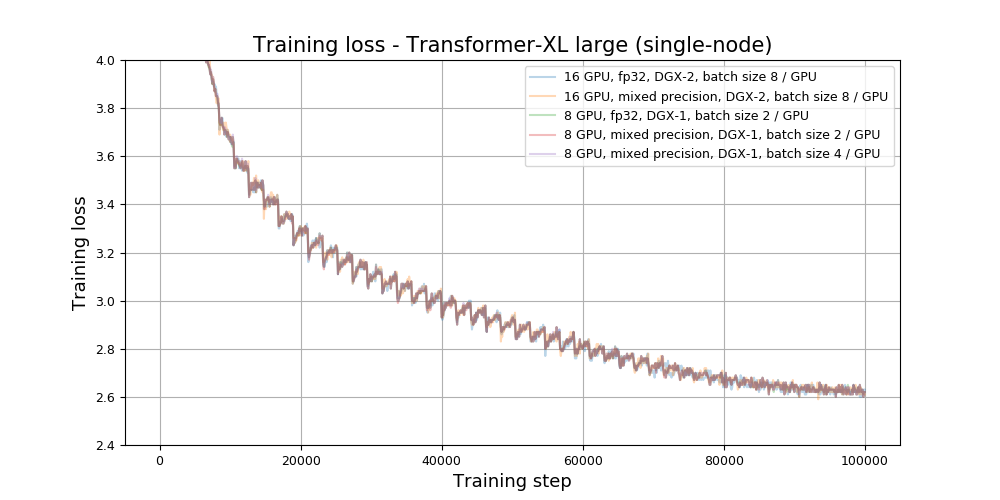
Large model (multi-node)

Training stability test
Base model
The Transformer-XL base model was trained for 40,000 training steps, starting from 16 different initial random seeds. After every 5,000 training steps, the model was evaluated on the validation dataset and validation perplexity was recorded. The training was performed in the pytorch-20.06-py3 NGC container on NVIDIA DGX A100 with 8x A100 40GB GPUs. The following table summarizes the perplexity of our validation dataset.
| Training step | Average perplexity | Standard deviation | Minimum | Maximum | Median |
|---|---|---|---|---|---|
| 5000 | 42.62 | 0.27311 | 42.01 | 43.09 | 42.67 |
| 10000 | 32.31 | 0.12814 | 32.10 | 32.59 | 32.31 |
| 15000 | 28.38 | 0.10764 | 28.23 | 28.57 | 28.35 |
| 20000 | 26.14 | 0.10218 | 25.96 | 26.36 | 26.14 |
| 25000 | 24.59 | 0.09060 | 24.42 | 24.81 | 24.60 |
| 30000 | 23.71 | 0.07259 | 23.61 | 23.84 | 23.71 |
| 35000 | 23.15 | 0.04781 | 23.05 | 23.26 | 23.15 |
| 40000 | 22.93 | 0.05593 | 22.83 | 23.04 | 22.94 |
After training, the models were evaluated on the test dataset. The following table summarizes the final perplexity on the test set.
| Average perplexity | Standard deviation | Minimum | Maximum | Median |
|---|---|---|---|---|
| 23.24 | 0.07794 | 23.11 | 23.38 | 23.25 |
Large model (single-node)
The Transformer-XL large model was trained for 100,000 training steps, starting from 16 different initial random seeds. After every 10,000 training steps, the model was evaluated on the validation dataset and validation perplexity was recorded. The training was performed in the pytorch-20.06-py3 NGC container on NVIDIA DGX A100 with 8x A100 40GB GPUs. The following table summarizes the perplexity of our validation dataset.
| Training step | Average perplexity | Standard deviation | Minimum | Maximum | Median |
|---|---|---|---|---|---|
| 10000 | 32.63 | 0.20432 | 32.34 | 33.05 | 32.62 |
| 20000 | 24.08 | 0.10980 | 23.90 | 24.28 | 24.10 |
| 30000 | 21.52 | 0.09069 | 21.36 | 21.66 | 21.52 |
| 40000 | 20.17 | 0.06922 | 20.06 | 20.27 | 20.17 |
| 50000 | 19.23 | 0.05975 | 19.11 | 19.33 | 19.24 |
| 60000 | 18.57 | 0.06008 | 18.47 | 18.72 | 18.56 |
| 70000 | 18.17 | 0.06473 | 18.08 | 18.32 | 18.15 |
| 80000 | 17.95 | 0.06506 | 17.82 | 18.08 | 17.94 |
| 90000 | 17.80 | 0.04350 | 17.71 | 17.90 | 17.80 |
| 100000 | 17.80 | 0.03592 | 17.74 | 17.86 | 17.81 |
After training, the models were evaluated on the test dataset. The following table summarizes the final perplexity on the test set.
| Average perplexity | Standard deviation | Minimum | Maximum | Median |
|---|---|---|---|---|
| 18.17 | 0.04016 | 18.09 | 18.24 | 18.17 |
Large model (multi-node)
The Transformer-XL large model was trained for 25,000 training steps, starting from 10 different initial random seeds. After every 1,000 training steps, the model was evaluated on the validation dataset and validation perplexity was recorded. The training was performed in the pytorch-20.06-py3 NGC container on 8x NVIDIA DGX-2H with 16x V100 32GB GPUs. The following table summarizes the perplexity of our validation dataset.
| Training step | Average perplexity | Standard deviation | Minimum | Maximum | Median |
|---|---|---|---|---|---|
| 1000 | 608.09 | 3.80116 | 600.65 | 613.73 | 609.40 |
| 2000 | 142.75 | 0.94452 | 141.21 | 143.84 | 143.07 |
| 3000 | 62.19 | 0.44544 | 61.38 | 63.01 | 62.18 |
| 4000 | 40.22 | 0.16397 | 39.93 | 40.54 | 40.20 |
| 5000 | 32.00 | 0.15850 | 31.61 | 32.19 | 32.02 |
| 6000 | 28.05 | 0.17854 | 27.81 | 28.41 | 28.05 |
| 7000 | 25.65 | 0.10946 | 25.51 | 25.87 | 25.65 |
| 8000 | 24.20 | 0.11385 | 23.98 | 24.36 | 24.20 |
| 9000 | 23.18 | 0.14936 | 22.84 | 23.37 | 23.20 |
| 10000 | 22.88 | 0.22752 | 22.54 | 23.33 | 22.94 |
| 11000 | 21.99 | 0.16232 | 21.73 | 22.29 | 21.97 |
| 12000 | 21.69 | 0.10824 | 21.46 | 21.81 | 21.73 |
| 13000 | 21.42 | 0.09154 | 21.25 | 21.57 | 21.44 |
| 14000 | 21.33 | 0.13821 | 21.15 | 21.55 | 21.27 |
| 15000 | 21.24 | 0.15526 | 20.95 | 21.57 | 21.20 |
| 16000 | 21.19 | 0.10521 | 21.01 | 21.44 | 21.18 |
| 17000 | 20.89 | 0.18239 | 20.69 | 21.18 | 20.82 |
| 18000 | 20.36 | 0.10715 | 20.21 | 20.53 | 20.34 |
| 19000 | 19.74 | 0.12803 | 19.45 | 19.92 | 19.75 |
| 20000 | 19.18 | 0.10020 | 19.05 | 19.39 | 19.15 |
| 21000 | 18.49 | 0.06319 | 18.36 | 18.60 | 18.49 |
| 22000 | 18.17 | 0.03674 | 18.11 | 18.22 | 18.16 |
| 23000 | 17.98 | 0.03682 | 17.90 | 18.04 | 17.99 |
| 24000 | 17.88 | 0.02880 | 17.84 | 17.92 | 17.89 |
| 25000 | 17.85 | 0.02793 | 17.80 | 17.90 | 17.86 |
After training, the models were evaluated on the test dataset. The following table summarizes the final perplexity on the test set.
| Average perplexity | Standard deviation | Minimum | Maximum | Median |
|---|---|---|---|---|
| 18.30 | 0.02747 | 18.24 | 18.33 | 18.30 |
Training performance results
Training performance: NVIDIA DGX A100 (8x A100 40GB)
Base model
Our results were obtained by running the pytorch/run_wt103_base.sh training
script in the pytorch-20.06-py3 NGC container on NVIDIA DGX A100 with 8x A100
40GB GPUs. Performance numbers (in tokens per second) were averaged over 500
training iterations.
| GPUs | Batch Size / GPU | Throughput - TF32 (tok/s) | Throughput - Mixed precision (tok/s) | Throughput speedup (TF32 to Mixed precision) | Weak Scaling - TF32 | Weak Scaling - Mixed precision |
|---|---|---|---|---|---|---|
| 1 | 32 | 41,527 | 59,961 | 1.444 | 1.000 | 1.000 |
| 2 | 32 | 77,625 | 113,238 | 1.459 | 1.869 | 1.889 |
| 4 | 32 | 153,945 | 225,609 | 1.466 | 3.707 | 3.763 |
| 8 | 32 | 305,933 | 449,890 | 1.471 | 7.367 | 7.503 |
To achieve these same results, follow the steps in the Quick Start Guide to download the dataset and setup the container, and then proceed to the Training performance benchmark section for instruction on how to launch the benchmark.
Large model
Our results were obtained by running the pytorch/run_wt103_large.sh training
script in the pytorch-20.06-py3 NGC container on NVIDIA DGX A100 with 8x A100
40GB GPUs. Performance numbers (in tokens per second) were averaged over 500
training iterations.
| GPUs | Batch Size / GPU | Throughput - TF32 (tok/s) | Throughput - Mixed precision (tok/s) | Throughput speedup (TF32 to Mixed precision) | Weak Scaling - TF32 | Weak Scaling - Mixed precision |
|---|---|---|---|---|---|---|
| 1 | 8 | 14,497 | 21,554 | 1.487 | 1.000 | 1.000 |
| 2 | 8 | 27,304 | 40,222 | 1.473 | 1.883 | 1.866 |
| 4 | 8 | 53,756 | 80,226 | 1.492 | 3.708 | 3.722 |
| 8 | 8 | 106,651 | 159,185 | 1.493 | 7.357 | 7.385 |
| 1 | 16 | N/A | 25,084 | 1.730 | N/A | 1.000 |
| 2 | 16 | N/A | 48,562 | 1.779 | N/A | 1.936 |
| 4 | 16 | N/A | 95,997 | 1.786 | N/A | 3.827 |
| 8 | 16 | N/A | 191,148 | 1.792 | N/A | 7.620 |
To achieve these same results, follow the steps in the Quick Start Guide to download the dataset and setup the container, and then proceed to the Training performance benchmark section for instruction on how to launch the benchmark.
Training performance: NVIDIA DGX-1 (8x V100 16GB)
Base model
Our results were obtained by running the pytorch/run_wt103_base.sh training
script in the pytorch-20.06-py3 NGC container on NVIDIA DGX-1 with 8x V100 16GB
GPUs. Performance numbers (in tokens per second) were averaged over 500
training iterations.
| GPUs | Batch Size / GPU | Throughput - FP32 (tok/s) | Throughput - Mixed precision (tok/s) | Throughput speedup (FP32 to Mixed precision) | Weak Scaling - FP32 | Weak Scaling - Mixed precision |
|---|---|---|---|---|---|---|
| 1 | 16 | 13,981 | 26,639 | 1.905 | 1.000 | 1.000 |
| 2 | 16 | 23,163 | 45,299 | 1.956 | 1.657 | 1.700 |
| 4 | 16 | 48,893 | 92,618 | 1.894 | 3.497 | 3.477 |
| 8 | 16 | 97,005 | 170,532 | 1.758 | 6.938 | 6.402 |
| 1 | 32 | N/A | 36,692 | 2.624 | N/A | 1.000 |
| 2 | 32 | N/A | 65,889 | 2.845 | N/A | 1.796 |
| 4 | 32 | N/A | 133,838 | 2.737 | N/A | 3.648 |
| 8 | 32 | N/A | 258,648 | 2.666 | N/A | 7.049 |
To achieve these same results, follow the steps in the Quick Start Guide to download the dataset and setup the container, and then proceed to the Training performance benchmark section for instruction on how to launch the benchmark.
Large model
Our results were obtained by running the pytorch/run_wt103_large.sh training
script in the pytorch-20.06-py3 NGC container on NVIDIA DGX-1 with 8x V100 16GB
GPUs. Performance numbers (in tokens per second) were averaged over 500
training iterations.
| GPUs | Batch Size / GPU | Throughput - FP32 (tok/s) | Throughput - Mixed precision (tok/s) | Throughput speedup (FP32 to Mixed precision) | Weak Scaling - FP32 | Weak Scaling - Mixed precision |
|---|---|---|---|---|---|---|
| 1 | 2 | 3,558 | 6,907 | 1.941 | 1.000 | 1.000 |
| 2 | 2 | 6,153 | 11,272 | 1.832 | 1.729 | 1.632 |
| 4 | 2 | 12,492 | 22,530 | 1.804 | 3.511 | 3.262 |
| 8 | 2 | 24,595 | 40,920 | 1.664 | 6.913 | 5.925 |
| 1 | 4 | N/A | 10,210 | 2.870 | N/A | 1.000 |
| 2 | 4 | N/A | 17,984 | 2.923 | N/A | 1.761 |
| 4 | 4 | N/A | 36,340 | 2.909 | N/A | 3.559 |
| 8 | 4 | N/A | 66,716 | 2.713 | N/A | 6.535 |
To achieve these same results, follow the steps in the Quick Start Guide to download the dataset and setup the container, and then proceed to the Training performance benchmark section for instruction on how to launch the benchmark.
Training performance: NVIDIA DGX-2H (16x V100 32GB)
Base model
Our results were obtained by running the pytorch/run_wt103_base.sh training
script in the pytorch-20.06-py3 NGC container on NVIDIA DGX-2H with 16x V100
32GB GPUs. Performance numbers (in tokens per second) were averaged over 500
training iterations.
| GPUs | Batch Size / GPU | Throughput - FP32 (tok/s) | Throughput - Mixed precision (tok/s) | Throughput speedup (FP32 to Mixed precision) | Weak Scaling - FP32 | Weak Scaling - Mixed precision |
|---|---|---|---|---|---|---|
| 1 | 16 | 16,150 | 32,875 | 2.036 | 1.000 | 1.000 |
| 2 | 16 | 29,712 | 59,058 | 1.988 | 1.840 | 1.796 |
| 4 | 16 | 58,011 | 113,985 | 1.965 | 3.592 | 3.467 |
| 8 | 16 | 114,655 | 223,907 | 1.953 | 7.099 | 6.811 |
| 16 | 16 | 222,920 | 414,994 | 1.862 | 13.803 | 12.623 |
To achieve these same results, follow the steps in the Quick Start Guide to download the dataset and setup the container, and then proceed to the Training performance benchmark section for instruction on how to launch the benchmark.
Large model
Our results were obtained by running the pytorch/run_wt103_large.sh training
script in the pytorch-20.06-py3 NGC container on NVIDIA DGX-2H with 16x V100
32GB GPUs. Performance numbers (in tokens per second) were averaged over 500
training iterations.
| GPUs | Batch Size / GPU | Throughput - FP32 (tok/s) | Throughput - Mixed precision (tok/s) | Throughput speedup (FP32 to Mixed precision) | Weak Scaling - FP32 | Weak Scaling - Mixed precision |
|---|---|---|---|---|---|---|
| 1 | 8 | 5,169 | 14,787 | 2.861 | 1.000 | 1.000 |
| 2 | 8 | 9,977 | 27,710 | 2.777 | 1.930 | 1.874 |
| 4 | 8 | 19,691 | 54,207 | 2.753 | 3.810 | 3.666 |
| 8 | 8 | 39,157 | 107,073 | 2.734 | 7.576 | 7.241 |
| 16 | 8 | 77,568 | 211,387 | 2.725 | 15.008 | 14.296 |
To achieve these same results, follow the steps in the Quick Start Guide to download the dataset and setup the container, and then proceed to the Training performance benchmark section for instruction on how to launch the benchmark.
Training performance: 8x NVIDIA DGX-2H (16x V100 32GB)
Our results were obtained by running the pytorch/run.sub training script in
the pytorch-20.06-py3 NGC container. Performance numbers (in tokens per second)
were averaged over 500 training iterations.
Large model
| DGX System | Nodes | Batch Size / GPU | Throughput - FP32 (tok/s) | Throughput - Mixed precision (tok/s) | Throughput speedup (FP32 to Mixed precision) | Weak Scaling - FP32 | Weak scaling - Mixed precision |
|---|---|---|---|---|---|---|---|
| DGX-2H | 1 | 4 | 69,070 | 154,950 | 2.24 | 1.00 | 1.00 |
| DGX-2H | 2 | 4 | 136,960 | 307,520 | 2.25 | 1.98 | 1.98 |
| DGX-2H | 4 | 4 | 270,120 | 605,530 | 2.24 | 3.91 | 3.91 |
| DGX-2H | 8 | 4 | 514,500 | 1,189,700 | 2.31 | 7.45 | 7.68 |
To achieve these same results, follow the steps in the
Quick Start Guide to download the dataset and then
proceed to the
Training performance benchmark for
multi-node section for
instruction on how to launch the multi-node performance benchmark. The numbers
presented above were obtained with LOCAL_BATCH_SIZE=4.
Inference performance results
Inference performance: NVIDIA DGX A100 (1x A100 40GB)
Base model
Our results were obtained by running the
pytorch/scripts/inference_benchmark.sh inferencing benchmarking script in the
pytorch-20.06-py3 NGC container on NVIDIA DGX A100 with 1x A100 40GB GPU.
The command to launch the inference performance benchmark is provided in the Inference performance benchmark section.
FP16, pure Python
| Batch size | Sequence length | Memory length | Throughput Avg (tok/s) | Latency Avg (ms) | Latency 90% (ms) | Latency 95% (ms) | Latency 99% (ms) |
|---|---|---|---|---|---|---|---|
| 1 | 64 | 640 | 4,163.7 | 15.38 | 15.58 | 15.66 | 16.12 |
| 2 | 64 | 640 | 7,915.4 | 16.17 | 16.36 | 16.42 | 17.19 |
| 4 | 64 | 640 | 15,710.2 | 16.29 | 16.45 | 16.49 | 17.38 |
| 8 | 64 | 640 | 32,712.1 | 15.64 | 15.77 | 15.82 | 16.65 |
| 16 | 64 | 640 | 59,378.6 | 17.23 | 17.32 | 17.36 | 18.39 |
| 32 | 64 | 640 | 91,654.2 | 22.33 | 22.39 | 22.53 | 23.63 |
FP16, TorchScript
| Batch size | Sequence length | Memory length | Throughput Avg (tok/s) | Latency Avg (ms) | Latency 90% (ms) | Latency 95% (ms) | Latency 99% (ms) |
|---|---|---|---|---|---|---|---|
| 1 | 64 | 640 | 6,935.9 | 9.231 | 9.388 | 9.445 | 9.534 |
| 2 | 64 | 640 | 12,649.4 | 10.120 | 10.253 | 10.294 | 10.945 |
| 4 | 64 | 640 | 25,029.5 | 10.223 | 10.346 | 10.381 | 10.475 |
| 8 | 64 | 640 | 52,666.3 | 9.716 | 9.808 | 9.851 | 10.540 |
| 16 | 64 | 640 | 90,767.8 | 11.274 | 11.321 | 11.334 | 11.800 |
| 32 | 64 | 640 | 107,082.4 | 19.109 | 19.138 | 19.162 | 19.608 |
TF32, pure Python
| Batch size | Sequence length | Memory length | Throughput Avg (tok/s) | Latency Avg (ms) | Latency 90% (ms) | Latency 95% (ms) | Latency 99% (ms) |
|---|---|---|---|---|---|---|---|
| 1 | 64 | 640 | 4,003.8 | 15.99 | 16.26 | 16.36 | 16.58 |
| 2 | 64 | 640 | 7,499.2 | 17.07 | 17.32 | 17.39 | 17.86 |
| 4 | 64 | 640 | 14,835.4 | 17.25 | 17.46 | 17.50 | 18.34 |
| 8 | 64 | 640 | 30,001.5 | 17.06 | 17.22 | 17.28 | 18.40 |
| 16 | 64 | 640 | 50,189.7 | 20.39 | 20.48 | 20.52 | 21.41 |
| 32 | 64 | 640 | 63,660.5 | 32.14 | 32.17 | 32.29 | 33.19 |
TF32, TorchScript
| Batch size | Sequence length | Memory length | Throughput Avg (tok/s) | Latency Avg (ms) | Latency 90% (ms) | Latency 95% (ms) | Latency 99% (ms) |
|---|---|---|---|---|---|---|---|
| 1 | 64 | 640 | 6,084.5 | 10.52 | 10.74 | 10.84 | 10.95 |
| 2 | 64 | 640 | 11,680.6 | 10.96 | 11.17 | 11.22 | 11.76 |
| 4 | 64 | 640 | 22,867.3 | 11.19 | 11.35 | 11.40 | 12.07 |
| 8 | 64 | 640 | 45,165.5 | 11.33 | 11.46 | 11.49 | 12.03 |
| 16 | 64 | 640 | 61,042.0 | 16.76 | 16.84 | 16.86 | 17.13 |
| 32 | 64 | 640 | 71,124.1 | 28.77 | 28.81 | 28.84 | 28.86 |
To achieve these same results, follow the steps in the Quick Start Guide to download the dataset and setup the container, and then proceed to the Inference performance benchmark section for instruction on how to launch the benchmark.
Large model
Our results were obtained by running the
pytorch/scripts/inference_benchmark.sh inferencing benchmarking script in the
pytorch-20.06-py3 NGC container on NVIDIA DGX A100 with 1x A100 40GB GPU.
The command to launch the inference performance benchmark is provided in the Inference performance benchmark section.
FP16, pure Python
| Batch size | Sequence length | Memory length | Throughput Avg (tok/s) | Latency Avg (ms) | Latency 90% (ms) | Latency 95% (ms) | Latency 99% (ms) |
|---|---|---|---|---|---|---|---|
| 1 | 128 | 1,600 | 7,033.0 | 18.20 | 18.57 | 18.64 | 18.93 |
| 2 | 128 | 1,600 | 12,832.5 | 19.94 | 20.23 | 20.29 | 21.07 |
| 4 | 128 | 1,600 | 21,500.2 | 23.80 | 23.99 | 24.07 | 25.09 |
| 8 | 128 | 1,600 | 25,797.1 | 39.66 | 39.74 | 39.91 | 41.00 |
| 16 | 128 | 1,600 | 28,143.5 | 72.71 | 72.74 | 73.12 | 74.00 |
| 32 | 128 | 1,600 | 28,533.6 | 143.44 | 143.30 | 143.48 | 149.07 |
FP16, TorchScript
| Batch size | Sequence length | Memory length | Throughput Avg (tok/s) | Latency Avg (ms) | Latency 90% (ms) | Latency 95% (ms) | Latency 99% (ms) |
|---|---|---|---|---|---|---|---|
| 1 | 128 | 1,600 | 11,068.2 | 11.57 | 11.83 | 11.88 | 12.42 |
| 2 | 128 | 1,600 | 19,847.0 | 12.89 | 13.09 | 13.11 | 13.27 |
| 4 | 128 | 1,600 | 24,450.7 | 20.92 | 21.08 | 21.10 | 21.15 |
| 8 | 128 | 1,600 | 27,938.4 | 36.62 | 36.72 | 36.75 | 36.86 |
| 16 | 128 | 1,600 | 30,783.0 | 66.48 | 66.54 | 66.59 | 66.98 |
| 32 | 128 | 1,600 | 32,161.6 | 127.26 | 127.19 | 127.34 | 131.64 |
TF32, pure Python
| Batch size | Sequence length | Memory length | Throughput Avg (tok/s) | Latency Avg (ms) | Latency 90% (ms) | Latency 95% (ms) | Latency 99% (ms) |
|---|---|---|---|---|---|---|---|
| 1 | 128 | 1,600 | 6,558.8 | 19.52 | 19.87 | 19.95 | 20.44 |
| 2 | 128 | 1,600 | 10,658.4 | 24.00 | 24.28 | 24.36 | 25.17 |
| 4 | 128 | 1,600 | 14,769.6 | 34.64 | 34.82 | 34.89 | 35.74 |
| 8 | 128 | 1,600 | 16,852.6 | 60.71 | 60.82 | 61.05 | 62.17 |
| 16 | 128 | 1,600 | 18,071.8 | 113.23 | 113.28 | 113.37 | 114.64 |
| 32 | 128 | 1,600 | 17,619.2 | 234.04 | 229.98 | 239.30 | 328.15 |
TF32, TorchScript
| Batch size | Sequence length | Memory length | Throughput Avg (tok/s) | Latency Avg (ms) | Latency 90% (ms) | Latency 95% (ms) | Latency 99% (ms) |
|---|---|---|---|---|---|---|---|
| 1 | 128 | 1,600 | 9,084.4 | 14.09 | 14.37 | 14.40 | 14.46 |
| 2 | 128 | 1,600 | 12,839.4 | 19.92 | 20.15 | 20.17 | 20.25 |
| 4 | 128 | 1,600 | 15,582.4 | 32.83 | 33.00 | 33.02 | 33.28 |
| 8 | 128 | 1,600 | 17,825.0 | 57.40 | 57.55 | 57.59 | 57.94 |
| 16 | 128 | 1,600 | 19,419.2 | 105.38 | 105.49 | 105.54 | 105.91 |
| 32 | 128 | 1,600 | 20,079.4 | 203.81 | 203.77 | 203.84 | 207.47 |
To achieve these same results, follow the steps in the Quick Start Guide to download the dataset and setup the container, and then proceed to the Inference performance benchmark section for instruction on how to launch the benchmark.
Inference performance: NVIDIA DGX-1 (1x V100 16GB)
Base model
Our results were obtained by running the
pytorch/scripts/inference_benchmark.sh inferencing benchmarking script in the
pytorch-20.06-py3 NGC container on NVIDIA DGX-1 with 1x V100 16GB GPU.
The command to launch the inference performance benchmark is provided in the Inference performance benchmark section.
FP16, pure Python
| Batch size | Sequence length | Memory length | Throughput Avg (tok/s) | Latency Avg (ms) | Latency 90% (ms) | Latency 95% (ms) | Latency 99% (ms) |
|---|---|---|---|---|---|---|---|
| 1 | 64 | 640 | 2,999.6 | 21.36 | 21.72 | 21.90 | 24.86 |
| 2 | 64 | 640 | 5,738.5 | 22.32 | 22.64 | 22.89 | 25.97 |
| 4 | 64 | 640 | 11,773.5 | 21.73 | 21.92 | 22.06 | 22.68 |
| 8 | 64 | 640 | 22,604.7 | 22.63 | 22.92 | 23.08 | 23.56 |
| 16 | 64 | 640 | 41,481.6 | 24.67 | 24.83 | 24.99 | 25.73 |
| 32 | 64 | 640 | 58,556.9 | 34.95 | 35.13 | 35.24 | 35.85 |
FP16, TorchScript
| Batch size | Sequence length | Memory length | Throughput Avg (tok/s) | Latency Avg (ms) | Latency 90% (ms) | Latency 95% (ms) | Latency 99% (ms) |
|---|---|---|---|---|---|---|---|
| 1 | 64 | 640 | 5,199.9 | 12.31 | 12.59 | 12.65 | 12.98 |
| 2 | 64 | 640 | 9,802.5 | 13.06 | 13.30 | 13.42 | 13.82 |
| 4 | 64 | 640 | 19,609.4 | 13.05 | 13.17 | 13.24 | 13.94 |
| 8 | 64 | 640 | 37,598.7 | 13.61 | 13.71 | 13.77 | 14.62 |
| 16 | 64 | 640 | 57,840.2 | 17.69 | 17.73 | 17.76 | 18.36 |
| 32 | 64 | 640 | 66,955.9 | 30.57 | 30.78 | 30.86 | 30.96 |
FP32, pure Python
| Batch size | Sequence length | Memory length | Throughput Avg (tok/s) | Latency Avg (ms) | Latency 90% (ms) | Latency 95% (ms) | Latency 99% (ms) |
|---|---|---|---|---|---|---|---|
| 1 | 64 | 640 | 2,940.0 | 21.79 | 22.23 | 22.42 | 25.52 |
| 2 | 64 | 640 | 5,652.0 | 22.66 | 23.00 | 23.20 | 26.86 |
| 4 | 64 | 640 | 10,526.0 | 24.30 | 24.62 | 24.72 | 25.03 |
| 8 | 64 | 640 | 15,767.2 | 32.45 | 32.67 | 32.78 | 33.32 |
| 16 | 64 | 640 | 20,303.2 | 50.39 | 50.82 | 50.89 | 51.07 |
| 32 | 64 | 640 | 21,707.1 | 94.26 | 94.76 | 94.94 | 95.26 |
FP32, TorchScript
| Batch size | Sequence length | Memory length | Throughput Avg (tok/s) | Latency Avg (ms) | Latency 90% (ms) | Latency 95% (ms) | Latency 99% (ms) |
|---|---|---|---|---|---|---|---|
| 1 | 64 | 640 | 4,974.1 | 12.88 | 13.25 | 13.37 | 13.69 |
| 2 | 64 | 640 | 9,625.3 | 13.30 | 13.58 | 13.72 | 14.15 |
| 4 | 64 | 640 | 15,069.9 | 16.98 | 17.27 | 17.35 | 17.54 |
| 8 | 64 | 640 | 18,269.8 | 28.00 | 28.23 | 28.28 | 28.37 |
| 16 | 64 | 640 | 20,884.5 | 48.99 | 49.46 | 49.50 | 49.63 |
| 32 | 64 | 640 | 22,289.2 | 91.80 | 92.25 | 92.56 | 92.67 |
To achieve these same results, follow the steps in the Quick Start Guide to download the dataset and setup the container, and then proceed to the Inference performance benchmark section for instruction on how to launch the benchmark.
Large model
Our results were obtained by running the
pytorch/scripts/inference_benchmark.sh inferencing benchmarking script in the
pytorch-20.06-py3 NGC container on NVIDIA DGX-1 with 1x V100 16GB GPU.
The command to launch the inference performance benchmark is provided in the Inference performance benchmark section.
FP16, pure Python
| Batch size | Sequence length | Memory length | Throughput Avg (tok/s) | Latency Avg (ms) | Latency 90% (ms) | Latency 95% (ms) | Latency 99% (ms) |
|---|---|---|---|---|---|---|---|
| 1 | 128 | 1,600 | 5,119.6 | 25.00 | 25.47 | 25.66 | 26.12 |
| 2 | 128 | 1,600 | 8,676.1 | 29.49 | 29.81 | 29.94 | 30.88 |
| 4 | 128 | 1,600 | 12,960.9 | 39.47 | 39.84 | 39.91 | 40.69 |
| 8 | 128 | 1,600 | 14,870.6 | 68.81 | 69.28 | 69.42 | 69.76 |
| 16 | 128 | 1,600 | 15,528.5 | 131.78 | 132.74 | 132.86 | 133.07 |
| 32 | 128 | 1,600 | 15,649.4 | 261.54 | 262.45 | 262.99 | 271.10 |
FP16, TorchScript
| Batch size | Sequence length | Memory length | Throughput Avg (tok/s) | Latency Avg (ms) | Latency 90% (ms) | Latency 95% (ms) | Latency 99% (ms) |
|---|---|---|---|---|---|---|---|
| 1 | 128 | 1,600 | 8,718.2 | 14.68 | 15.01 | 15.07 | 15.50 |
| 2 | 128 | 1,600 | 12,157.8 | 21.04 | 21.29 | 21.31 | 21.38 |
| 4 | 128 | 1,600 | 14,534.8 | 35.20 | 35.48 | 35.53 | 35.93 |
| 8 | 128 | 1,600 | 15,863.8 | 64.50 | 64.90 | 65.15 | 65.31 |
| 16 | 128 | 1,600 | 16,674.0 | 122.73 | 123.34 | 123.66 | 123.92 |
| 32 | 128 | 1,600 | 17,154.1 | 238.60 | 239.48 | 239.73 | 247.48 |
FP32, pure Python
| Batch size | Sequence length | Memory length | Throughput Avg (tok/s) | Latency Avg (ms) | Latency 90% (ms) | Latency 95% (ms) | Latency 99% (ms) |
|---|---|---|---|---|---|---|---|
| 1 | 128 | 1,600 | 3,009.8 | 42.52 | 43.01 | 43.09 | 43.53 |
| 2 | 128 | 1,600 | 3,838.4 | 66.64 | 67.24 | 67.45 | 67.83 |
| 4 | 128 | 1,600 | 4,265.3 | 119.94 | 120.87 | 121.00 | 121.39 |
| 8 | 128 | 1,600 | 4,646.5 | 220.19 | 221.30 | 221.50 | 221.68 |
| 16 | 128 | 1,600 | 4,805.4 | 426.39 | 426.25 | 426.47 | 427.25 |
| 32 | 128 | 1,600 | 4,787.4 | 855.09 | 854.95 | 855.46 | 912.05 |
FP32, TorchScript
| Batch size | Sequence length | Memory length | Throughput Avg (tok/s) | Latency Avg (ms) | Latency 90% (ms) | Latency 95% (ms) | Latency 99% (ms) |
|---|---|---|---|---|---|---|---|
| 1 | 128 | 1,600 | 3,319.0 | 38.56 | 38.91 | 39.01 | 39.19 |
| 2 | 128 | 1,600 | 3,925.2 | 65.16 | 65.74 | 65.89 | 66.12 |
| 4 | 128 | 1,600 | 4,344.1 | 117.76 | 118.46 | 118.55 | 118.69 |
| 8 | 128 | 1,600 | 4,716.2 | 216.94 | 217.99 | 218.27 | 218.69 |
| 16 | 128 | 1,600 | 4,922.1 | 415.72 | 417.16 | 417.32 | 417.59 |
| 32 | 128 | 1,600 | 4,965.2 | 824.98 | 821.79 | 831.71 | 952.47 |
To achieve these same results, follow the steps in the Quick Start Guide to download the dataset and setup the container, and then proceed to the Inference performance benchmark section for instruction on how to launch the benchmark.
Inference performance: NVIDIA T4
Base model
Our results were obtained by running the
pytorch/scripts/inference_benchmark.sh inferencing benchmarking script in the
pytorch-20.06-py3 NGC container on NVIDIA T4.
The command to launch the inference performance benchmark is provided in the Inference performance benchmark section.
FP16, pure Python
| Batch size | Sequence length | Memory length | Throughput Avg (tok/s) | Latency Avg (ms) | Latency 90% (ms) | Latency 95% (ms) | Latency 99% (ms) |
|---|---|---|---|---|---|---|---|
| 1 | 64 | 640 | 3,775.3 | 16.97 | 17.51 | 17.84 | 18.18 |
| 2 | 64 | 640 | 6,417.4 | 19.96 | 20.49 | 20.56 | 21.52 |
| 4 | 64 | 640 | 9,988.6 | 25.64 | 26.07 | 26.14 | 27.32 |
| 8 | 64 | 640 | 11,878.9 | 43.07 | 43.42 | 43.46 | 44.24 |
| 16 | 64 | 640 | 13,630.0 | 75.07 | 75.26 | 75.32 | 76.07 |
| 32 | 64 | 640 | 14,511.2 | 141.01 | 141.38 | 141.41 | 142.16 |
FP16, TorchScript
| Batch size | Sequence length | Memory length | Throughput Avg (tok/s) | Latency Avg (ms) | Latency 90% (ms) | Latency 95% (ms) | Latency 99% (ms) |
|---|---|---|---|---|---|---|---|
| 1 | 64 | 640 | 6,132.5 | 10.47 | 10.93 | 11.31 | 11.45 |
| 2 | 64 | 640 | 8,319.4 | 15.39 | 15.89 | 15.92 | 16.10 |
| 4 | 64 | 640 | 11,259.1 | 22.74 | 23.16 | 23.23 | 23.30 |
| 8 | 64 | 640 | 13,120.3 | 38.99 | 39.35 | 39.37 | 39.42 |
| 16 | 64 | 640 | 15,120.0 | 67.67 | 67.90 | 67.94 | 68.06 |
| 32 | 64 | 640 | 16,158.1 | 126.65 | 126.97 | 127.03 | 127.18 |
FP32, pure Python
| Batch size | Sequence length | Memory length | Throughput Avg (tok/s) | Latency Avg (ms) | Latency 90% (ms) | Latency 95% (ms) | Latency 99% (ms) |
|---|---|---|---|---|---|---|---|
| 1 | 64 | 640 | 2,323.1 | 27.59 | 29.39 | 29.56 | 29.86 |
| 2 | 64 | 640 | 3,094.8 | 41.39 | 42.49 | 42.78 | 43.47 |
| 4 | 64 | 640 | 3,889.8 | 65.82 | 66.60 | 66.71 | 67.57 |
| 8 | 64 | 640 | 4,270.1 | 119.80 | 120.61 | 120.68 | 120.89 |
| 16 | 64 | 640 | 4,765.7 | 214.68 | 215.87 | 216.01 | 216.14 |
| 32 | 64 | 640 | 4,985.2 | 410.43 | 413.58 | 413.67 | 413.92 |
FP32, TorchScript
| Batch size | Sequence length | Memory length | Throughput Avg (tok/s) | Latency Avg (ms) | Latency 90% (ms) | Latency 95% (ms) | Latency 99% (ms) |
|---|---|---|---|---|---|---|---|
| 1 | 64 | 640 | 2,486.3 | 25.78 | 27.52 | 27.66 | 27.92 |
| 2 | 64 | 640 | 3,260.7 | 39.28 | 40.32 | 40.49 | 40.84 |
| 4 | 64 | 640 | 4,033.3 | 63.48 | 64.28 | 64.35 | 64.56 |
| 8 | 64 | 640 | 4,411.4 | 115.96 | 116.74 | 116.85 | 116.89 |
| 16 | 64 | 640 | 4,924.9 | 207.74 | 208.91 | 209.04 | 209.21 |
| 32 | 64 | 640 | 5,163.1 | 396.29 | 399.42 | 399.50 | 399.70 |
To achieve these same results, follow the steps in the Quick Start Guide to download the dataset and setup the container, and then proceed to the Inference performance benchmark section for instruction on how to launch the benchmark.
Large model
Our results were obtained by running the
pytorch/scripts/inference_benchmark.sh inferencing benchmarking script in the
pytorch-20.06-py3 NGC container on NVIDIA T4.
The command to launch the inference performance benchmark is provided in the Inference performance benchmark section.
FP16, pure Python
| Batch size | Sequence length | Memory length | Throughput Avg (tok/s) | Latency Avg (ms) | Latency 90% (ms) | Latency 95% (ms) | Latency 99% (ms) |
|---|---|---|---|---|---|---|---|
| 1 | 128 | 1,600 | 2,978.0 | 42.99 | 43.40 | 43.44 | 44.40 |
| 2 | 128 | 1,600 | 3,161.4 | 80.98 | 81.38 | 81.45 | 81.75 |
| 4 | 128 | 1,600 | 3,459.3 | 147.89 | 148.11 | 148.14 | 148.49 |
| 8 | 128 | 1,600 | 3,657.8 | 279.74 | 279.82 | 279.86 | 280.48 |
| 16 | 128 | 1,600 | 3,762.9 | 543.92 | 543.48 | 543.55 | 544.43 |
| 32 | 128 | 1,600 | 3,794.4 | 1079.15 | 1076.23 | 1076.37 | 1158.93 |
FP16, TorchScript
| Batch size | Sequence length | Memory length | Throughput Avg (tok/s) | Latency Avg (ms) | Latency 90% (ms) | Latency 95% (ms) | Latency 99% (ms) |
|---|---|---|---|---|---|---|---|
| 1 | 128 | 1,600 | 3,066.4 | 41.74 | 42.08 | 42.12 | 42.19 |
| 2 | 128 | 1,600 | 3,399.2 | 75.31 | 75.54 | 75.57 | 75.64 |
| 4 | 128 | 1,600 | 3,721.5 | 137.47 | 137.65 | 137.70 | 137.82 |
| 8 | 128 | 1,600 | 3,932.9 | 260.19 | 260.23 | 260.29 | 260.50 |
| 16 | 128 | 1,600 | 4,057.9 | 504.43 | 503.97 | 504.01 | 504.14 |
| 32 | 128 | 1,600 | 4,117.8 | 994.54 | 991.40 | 991.46 | 1079.17 |
FP32, pure Python
| Batch size | Sequence length | Memory length | Throughput Avg (tok/s) | Latency Avg (ms) | Latency 90% (ms) | Latency 95% (ms) | Latency 99% (ms) |
|---|---|---|---|---|---|---|---|
| 1 | 128 | 1,600 | 786.9 | 162.7 | 163.2 | 163.3 | 163.9 |
| 2 | 128 | 1,600 | 889.6 | 287.8 | 288.1 | 288.2 | 288.4 |
| 4 | 128 | 1,600 | 992.1 | 515.6 | 516.0 | 516.0 | 516.5 |
| 8 | 128 | 1,600 | 1,047.0 | 977.2 | 977.6 | 977.6 | 977.8 |
| 16 | 128 | 1,600 | 1,069.3 | 1913.5 | 1914.7 | 1914.7 | 1915.0 |
| 32 | 128 | 1,600 | 1,069.5 | 3826.3 | 3823.7 | 3823.8 | 3915.8 |
FP32, TorchScript
| Batch size | Sequence length | Memory length | Throughput Avg (tok/s) | Latency Avg (ms) | Latency 90% (ms) | Latency 95% (ms) | Latency 99% (ms) |
|---|---|---|---|---|---|---|---|
| 1 | 128 | 1,600 | 792.5 | 161.5 | 161.9 | 162.0 | 162.2 |
| 2 | 128 | 1,600 | 904.7 | 283.0 | 283.3 | 283.3 | 283.4 |
| 4 | 128 | 1,600 | 1,009.0 | 507.0 | 507.3 | 507.4 | 507.5 |
| 8 | 128 | 1,600 | 1,065.0 | 960.7 | 961.1 | 961.1 | 961.2 |
| 16 | 128 | 1,600 | 1,088.6 | 1879.7 | 1880.9 | 1881.0 | 1881.1 |
| 32 | 128 | 1,600 | 1,102.0 | 3713.7 | 3710.0 | 3718.1 | 3819.0 |
To achieve these same results, follow the steps in the Quick Start Guide to download the dataset and setup the container, and then proceed to the Inference performance benchmark section for instruction on how to launch the benchmark.
Release notes
Changelog
- June 2020
- Added support for NVIDIA DGX A100
- Updated default NGC container to pytorch-20.06-py3
- December 2019
- Added support for the large Transformer-XL model trained on WikiText-103 dataset, the large model was trained on NVIDIA DGX-1, NVIDIA DGX-2 and on 8x NVIDIA DGX-2H (multi-node training)
- Updated default NGC container to pytorch-19.11-py3
- Added support for inference with TorchScript
- October 2019
- Initial release
- Support for FP32 and mixed precision training on NVIDIA DGX-1, NVIDIA DGX-2, and inference on NVIDIA Tesla V100 16GB and NVIDIA T4
Known issues
There are no known issues with this model.